The app arranges illustrations of animals wearing lettered t-shirts to create user-supplied messages. Kara Schlindwein created the illustrations as part of her project for the 6th Annual Fun-a-Day project in Philadelphia, and I wrote the first draft of the app while sitting in a chair at the show a couple of weeks ago, still nursing my broken ankle.
I’ve come to really like working with Sinatra / HAML / SASS – once I had a basic comprehension of how the components fit together I could see how to organize the app without getting mired in the code. Making changes to the app has been pleasantly easy. Deployment via Passenger (mod_rails) on Apache was simple enough my my local and development servers (after reading sample virtual host configurations) and setting up a subdomain on Dreamhost has been fine, too. Everything is coordinated via git, so pushing changes around has been simple.
I first heard about Sinatra (and couchdb for that matter) in a presentation by Daniel Tsadock at ITP last year and I’ve kept it in the back of my mind as something I wanted to try. I’m just now getting to development of my thesis project website and decided to use Sinatra for it, although I had a disappointing experience with the performance of another Sinatra + couchrest app I wrote for the Live Experimental Interactive Television class this past week. My VPS development server ground to a halt when a dozen classmates attempted to use the app at the same time. I’m pretty sure that my code was somewhat inefficient (with each client polling couchdb through an api provided via Sinatra routes), however I was hoping for usability beyond 12 simultaneous connections. I’m still optimistic though that it will work, and writing an app with the framework and view templates is fast and actually pretty fun.
]]>
i finally got around to building a proof of concept implementation of tesseract-ocr for the iPhone. months ago, i documented the steps which helped to get the library cross-compiled for the iPhone’s ARM processor, and how to build a fat library for use with the simulator as well. several folks have helped immensely in noting how to actually run the engine in obj-c++. thanks to everyone who has commented so far.
anyway, below is a short video of the POC in action. the basic workflow is: select image from photo library or camera, crop tightly on the box of text you’d like to convert, wait while it processes, select / copy or email text.
there are loads of improvements which could be implemented (image histogram adjustment, rotation / perspective correction, automatic text box/layout detection, content detection – dates, links, contact information…) but this is a nice point to stop and document.
i realize that there are several OCR applications available for the iPhone, including a few which also run the engine on the device rather than handing it off to a web service. this started as an educational project on cross-compiling, and to fill a personal want for a handheld OCR app of my own. for these reasons, i’m going to open-source the entire app. look for it after this semester ends when i’ll have some more time to properly document the code. in the meantime, enjoy these code snippets demonstrating how to initialize the engine and process an image.
Initialize the engine:
    NSString *dataPath = [[self applicationDocumentsDirectory] stringByAppendingPathComponent:@"tessdata"];
    /*
     Set up the data in the docs dir
     want to copy the data to the documents folder if it doesn't already exist
     */
    NSFileManager *fileManager = [NSFileManager defaultManager];
    // If the expected store doesn't exist, copy the default store.
    if (![fileManager fileExistsAtPath:dataPath]) {
        // get the path to the app bundle (with the tessdata dir)
        NSString *bundlePath = [[NSBundle mainBundle] bundlePath];
        NSString *tessdataPath = [bundlePath stringByAppendingPathComponent:@"tessdata"];
        if (tessdataPath) {
            [fileManager copyItemAtPath:tessdataPath toPath:dataPath error:NULL];
        }
    }

    NSString *dataPathWithSlash = [[self applicationDocumentsDirectory] stringByAppendingString:@"/"];
    setenv("TESSDATA_PREFIX", [dataPathWithSlash UTF8String], 1);

    // init the tesseract engine.
    tess = new TessBaseAPI();

    tess->SimpleInit([dataPath cStringUsingEncoding:NSUTF8StringEncoding],  // Path to tessdata-no ending /.
                     "eng",  // ISO 639-3 string or NULL.
                     false);
Process an image. This should be threaded as it’s a heavy process:
    CGSize imageSize = [uiImage size];
    double bytes_per_line	= CGImageGetBytesPerRow([uiImage CGImage]);
    double bytes_per_pixel	= CGImageGetBitsPerPixel([uiImage CGImage]) / 8.0;

    CFDataRef data = CGDataProviderCopyData(CGImageGetDataProvider([uiImage CGImage]));
    const UInt8 *imageData = CFDataGetBytePtr(data);

    // this could take a while. maybe needs to happen asynchronously.
    char* text = tess->TesseractRect(imageData,
                                     bytes_per_pixel,
                                     bytes_per_line,
                                     0, 0,
                                     imageSize.width, imageSize.height);

    // Do something useful with the text!
    NSLog(@"Converted text: %@",[NSString stringWithCString:text encoding:NSUTF8StringEncoding]);

    delete[] text;
Enjoy the video!
the interface is clean and with keyboard shortcuts for each of the view modes. i do so wish for more info in the files panel….i’m used to comparing modification times and the sync features of full-fledged FTP clients.
anyway, it’s good software – and i’ve come to really appreciate good software lately after writing a lot of bad software myself.
]]> In preparation for several iPhone application development gigs which have lined up for the summer I’m getting back into my previous projects. Specifically, I’m going to get Follower and Pinwheel ready for release and am looking to push them out to the AppStore in the next month or so.
Also, as an exercise to get working with a web API I’m building an iPhone native client for SHIFD, called Slide. Right now it’s overly simplistic, but I much prefer the native app to the mobile web app. I’m not sure if I’m going to keep it as a learning project or also invest the time and resources to make it another released application.
All this is in service to building out cloudreader.me, the online version of the CloudReader generative text animation project. I’d like to make that something available sometime.
]]> I’ve had a few days to test the libraries I cobbled together for using openFrameworks with iPhone and also received positive reports from some folks who tried out the Makefiles I provided to them, so here they are for anyone who’s willing to try them out. -please make these instructions better if you see fit-
Update (7.8.2009): Fixed some errant quote mark substitutions in the freetype configure line. Also corrected a tab formatting error in the freeimage makefile.
Ok, here goes. This is going to be a work-in-progress document. Of course, there are no promises with this and your mileage may vary…but it’s been working for me. Please report success (and trouble, hopefully with workarounds).
The basic “tutorial” I followed is on Memo Akten’s blog, memo.tv
I’d highly suggest following Memo’s tutorial for setting up the development environment. However, there are three libraries that he mentions in his article that need to be built for the iPhone specifically: glu, freetype and freeimage. Although he mentions that they have been ported to iPhone I wasn’t able to locate binaries of the libraries, and went through the process of cross-compiling them myself. This post documents what I needed to do to accomplish that.
You’ll need to download the source for each of the libraries listed above, as well as a svn copy of open frameworks plus the ofxiPhone, ofxMultiTouch and ofxAccelerometer addons. I preferred to use ofx-dev which bundled this and many more addons. You also need the Apple Developer Tools including Xcode and the iPhone SDK.
GLU for iPhone:
The glu for iphone package builds painlessly. Build twice: once for the iPhone, once for the iPhone Simulator. Make sure to do a “make clean” before building the second version. The readme explains the make command. I copied the entire folder to ofx-dev/libs/gluiphone
The other two were more difficult for me. I’ve never cross-compiled, so perhaps that contributed to the trouble I had.
FreeImage:
Here is the makefile that I came up with, based on the existing files and what I saw in the glu makefile. Copy the makefile listed below as “Makefile.iphone” alongside the others in the source directory, then run “make -f Makefile.iphone”. This should build both the iPhone and iPhone Simulator libraries into the “Dist” folder. Copy both files to ofx-dev/libs/freeimage/lib
# Configuration for iPhone OS, making static libs
# this will generate both iPhone (arm) and iPhoneSimulator (i686) libs

include Makefile.srcs

CFLAGS =  -g -O2 -Wall -Wmissing-prototypes -std=c99 -ffast-math -fno-strict-aliasing
CXXFLAGS =  -g -O2 -Wall -fno-strict-aliasing

GCC_VERSION = 4.0
IPHONEOS_DEPLOYMENT_TARGET = 2.1
MACOSX_DEPLOYMENT_TARGET = 10.5

PLATFORM_SIM = iPhoneSimulator
PLATFORM_PHONE = iPhoneOS

ARCH_SIM = i686
ARCH_PHONE = armv6

PLATFORM_SIM_DEVELOPER_BIN_DIR = /Developer/Platforms/$(PLATFORM_SIM).platform/Developer/usr/bin
PLATFORM_PHONE_DEVELOPER_BIN_DIR = /Developer/Platforms/$(PLATFORM_PHONE).platform/Developer/usr/bin

SDKROOT_SIM = /Developer/Platforms/$(PLATFORM_SIM).platform/Developer/SDKs/$(PLATFORM_SIM)$(IPHONEOS_DEPLOYMENT_TARGET).sdk
SDKROOT_PHONE = /Developer/Platforms/$(PLATFORM_PHONE).platform/Developer/SDKs/$(PLATFORM_PHONE)$(IPHONEOS_DEPLOYMENT_TARGET).sdk

EXTRA_CFLAGS_SIM += -arch $(ARCH_SIM) -pipe -mdynamic-no-pic -fvisibility=hidden $(INCLUDE) -isysroot $(SDKROOT_SIM)
EXTRA_LDFLAGS_SIM += -arch $(ARCH_SIM) -isysroot $(SDKROOT_SIM) -Wl,-dead_strip
EXTRA_CFLAGS_SIM += -D__IPHONE_OS_VERSION_MIN_REQUIRED=20000 -mmacosx-version-min=$(MACOSX_DEPLOYMENT_TARGET)
EXTRA_LDFLAGS_SIM += -mmacosx-version-min=$(MACOSX_DEPLOYMENT_TARGET)

EXTRA_CFLAGS_PHONE += -arch $(ARCH_PHONE) -pipe -mdynamic-no-pic -fvisibility=hidden $(INCLUDE) -isysroot $(SDKROOT_PHONE)
EXTRA_LDFLAGS_PHONE += -arch $(ARCH_PHONE) -isysroot $(SDKROOT_PHONE) -Wl,-dead_strip
EXTRA_CFLAGS_PHONE += -miphoneos-version-min=$(IPHONEOS_DEPLOYMENT_TARGET)
EXTRA_LDFLAGS_PHONE += -miphoneos-version-min=$(IPHONEOS_DEPLOYMENT_TARGET)

AR_SIM = $(PLATFORM_SIM_DEVELOPER_BIN_DIR)/ar
AR_PHONE = $(PLATFORM_PHONE_DEVELOPER_BIN_DIR)/ar

CC_SIM = $(PLATFORM_SIM_DEVELOPER_BIN_DIR)/gcc-$(GCC_VERSION)
CC_PHONE = $(PLATFORM_PHONE_DEVELOPER_BIN_DIR)/gcc-$(GCC_VERSION)

CFLAGS_SIM = $(CFLAGS) $(EXTRA_CFLAGS_SIM)
LDFLAGS_SIM = $(EXTRA_LDFLAGS_SIM)
CXX_SIM = $(PLATFORM_SIM_DEVELOPER_BIN_DIR)/g++-$(GCC_VERSION)
CXXFLAGS_SIM += $(EXTRA_CFLAGS_SIM) -fvisibility-inlines-hidden
LIBTOOL_SIM = /Developer/Platforms/$(PLATFORM_SIM).platform/Developer/usr/bin/libtool

CFLAGS_PHONE = $(CFLAGS) $(EXTRA_CFLAGS_PHONE)
LDFLAGS_PHONE += $(EXTRA_LDFLAGS_PHONE)
CXX_PHONE = $(PLATFORM_PHONE_DEVELOPER_BIN_DIR)/g++-$(GCC_VERSION)
CXXFLAGS_PHONE += $(EXTRA_CFLAGS_PHONE) -fvisibility-inlines-hidden
LIBTOOL_PHONE = /Developer/Platforms/$(PLATFORM_PHONE).platform/Developer/usr/bin/libtool

TARGET = freeimage
STATICLIB_SIM = lib$(TARGET)-iphonesimulator.a
STATICLIB_PHONE = lib$(TARGET)-iphone.a
HEADER = Source/FreeImage.h

.SUFFIXES: .o-i686 .o-arm
MODULES_ARM = $(SRCS:.c=.o-arm)
MODULES_ARM := $(MODULES_ARM:.cpp=.o-arm)
MODULES_i686 = $(SRCS:.c=.o-i686)
MODULES_i686 := $(MODULES_i686:.cpp=.o-i686)

default: all

all: dist

dist: FreeImage
	cp *.a Dist
	cp Source/FreeImage.h Dist

FreeImage: $(STATICLIB_SIM) $(STATICLIB_PHONE)

$(STATICLIB_SIM): $(MODULES_i686)
	$(LIBTOOL_SIM) -arch_only i686 -o $@ $(MODULES_i686)

.c.o-i686:
	$(CC_SIM) $(CFLAGS_SIM) -c $< -o $@

.cpp.o-i686:
	$(CXX_SIM) $(CXXFLAGS_SIM) -c $< -o $@

$(STATICLIB_PHONE): $(MODULES_ARM)
	$(LIBTOOL_PHONE) -arch_only armv6 -o $@ $(MODULES_ARM)

.c.o-arm:
	$(CC_PHONE) $(CFLAGS_PHONE) -c $< -o $@

.cpp.o-arm:
	$(CXX_PHONE) $(CXXFLAGS_PHONE) -c $< -o $@

clean:
	rm -f core Dist/*.* u2dtmp* $(MODULES_i686) $(MODULES_ARM) $(STATICLIB_SIM) $(STATICLIB_PHONE)
FreeType:
Their makefile situation got me all confused so i just passed command like configure arguments as necessary. This is pretty ugly. -Please make this better someone-
#building freetytpe for iphone
# for iPhone
./configure --prefix=/usr/local/iphone --host=arm-apple-darwin --enable-static=yes --enable-shared=no CC=/Developer/Platforms/iPhoneOS.platform/Developer/usr/bin/arm-apple-darwin9-gcc-4.0.1 CFLAGS="-arch armv6 -pipe -mdynamic-no-pic -std=c99 -Wno-trigraphs -fpascal-strings -fasm-blocks -O0 -Wreturn-type -Wunused-variable -fmessage-length=0 -fvisibility=hidden -miphoneos-version-min=2.0 -gdwarf-2 -mthumb -I/Developer/Platforms/iPhoneOS.platform/Developer/SDKs/iPhoneOS2.0.sdk/usr/include/libxml2 -isysroot /Developer/Platforms/iPhoneOS.platform/Developer/SDKs/iPhoneOS2.0.sdk" CPP=/Developer/Platforms/iPhoneOS.platform/Developer/usr/bin/cpp AR=/Developer/Platforms/iPhoneOS.platform/Developer/usr/bin/ar LDFLAGS="-arch armv6 -isysroot /Developer/Platforms/iPhoneOS.platform/Developer/SDKs/iPhoneOS2.0.sdk -Wl,-dead_strip -miphoneos-version-min=2.0"

# for iPhone simulator
./configure --prefix=/usr/local/iphone --enable-static=yes --enable-shared=no CC=/Developer/Platforms/iPhoneSimulator.platform/Developer/usr/bin/gcc-4.0 CFLAGS="-arch i686 -pipe -mdynamic-no-pic -std=c99 -Wno-trigraphs -fpascal-strings -fasm-blocks -O0 -Wreturn-type -Wunused-variable -fmessage-length=0 -fvisibility=hidden -mmacosx-version-min=10.5  -I/Developer/Platforms/iPhoneSimulator.platform/Developer/SDKs/iPhoneSimulator2.0.sdk/usr/include/ -isysroot /Developer/Platforms/iPhoneSimulator.platform/Developer/SDKs/iPhoneSimulator2.0.sdk" CPP=/Developer/Platforms/iPhoneSimulator.platform/Developer/usr/bin/cpp AR=/Developer/Platforms/iPhoneSimulator.platform/Developer/usr/bin/ar LDFLAGS="-arch i686 -isysroot /Developer/Platforms/iPhoneSimulator.platform/Developer/SDKs/iPhoneSimulator2.0.sdk -Wl,-dead_strip -mmacosx-version-min=10.5"
Run one of the configure lines, then make. I got an error about “asm” being undefined…I think it was in include/freetype/config/ftconfig.h. Change “asm” to “__asm__” (that’s two underscores for both prefix and suffix). If it works then it drops the lib in a hidden dir: “./objs/.libs”. Copy the static lib out of there and rename it as appropriate. i’m using libfreetype-iphone.a and libfreetype-iphonesimulator.a. Run make clean and then run the other configure line and make again. There were some headers missing in from the freetype lib provided with ofx-dev that I noticed in the example ofxiPhone aps…so I copied the entire freetype folder to ofx-dev/libs/freetype-iphone. I put the libraries into freetype-iphone/lib so i could keep everything straight when setting up xcode.
Ok, I think this gets up to the point where we can set up xcode.
 Copy one of the ofxiPhone examples to ofx-dev/apps/dev and open it up in xcode. I used the Graphics example. There is some more explanation on Memo’s site about the project structure, but it was very similar to adding any other addons. However, I put gluiphone, freetype-iphone and freeimage into the libs>core>core libraries package in the xcode project. I’ve attached a screenshot to illustrate better than i can explain. (ofxVectorMath is there for the specific project i have open, is not required).
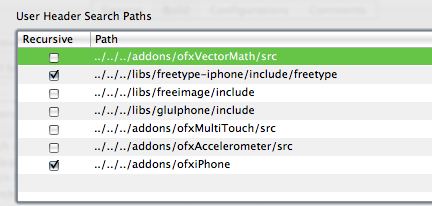
Go to menu Project>Edit Project Settings… and switch to the build tab. Set configuration to “All Configurations” and add in the library and header search paths as appropriate…just like setting up addons.
Set the Overview to Simulator – 2.0 | Debug and try to build. Make sure that all the appropriate libraries have been added to the Target. xcode seems to be able to pick the correct ones for the given architecture.

I initially got an error about a bad BOOL typedef in FreeImage.h:130 I changed it to typedef int8_t BOOL. In perhaps a separate issue, I don’t seem to be able to use the “Boolean” datatype, but can replace it with “bool” instead.
So, that’s what I did to get my system all set up to use openFrameworks with the iPhone. Feel free to let me know how it works out if you use this for yourself. Good luck!
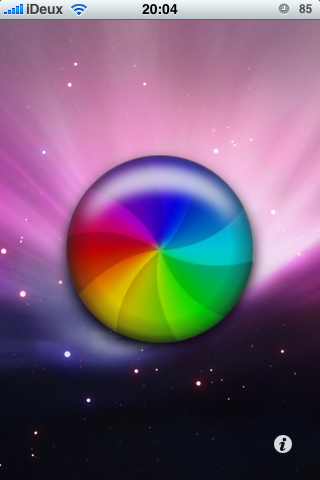
]]>the animation is too slow currently…i feel that i’m doing things in a really inefficient way at the moment. i had also tried using UIImageViews and animating them, but i couldn’t figure out a way to get the spinning layer to composite using the overlay blend mode…which you can easily do with core graphics contexts.
i’ll try again later, but i really need to get away from the computer and onto my bike to train (which is a matter of about five feet now that it’s dark and icy out). i’ll post a video if i can get the animation on the phone to happen more quickly.
regardless, i’ve finally gotten around to iPhone development. my developer account was approved last week, and apple happily took my $99 in exchange for slightly greater access to their website and an application code signing certificate. in preparation, i’ve been reading the requisite docs on objective-c, cocoa and iphone application programming. also, working on golden cheetah got me comfortable (sort of) coding in xcode.
i have plans for an extensive port of cloud reader, but for an initial run here’s a demo video of the follower app from the ITP haunted house running on iphone. it’s simply tracking taps and drags now, but i’d like to use the accelerometer next. check out the video: