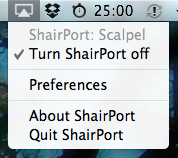
 Recently an open source emulator for AirPort Express / AirTunes was released by James Laird. I’ve been waiting for something like this for a long while to enable remote music playback on my media center from my laptop and iPhone. However, I lack the hardware skills to extract the necessary firmware from the AirPort Express ROM chip. Thanks to James for doing the work and putting out his perl script / c utility. It’s pretty simple to build and run, and the source includes a nice OS X launcher script, but I’m looking for a little GUI widget to easily control it lest someone ‘inadvertently’ decides to send audio to my computer.
I’ve been lately transitioning my iPhone-specific Cocoa knowledge to the desktop; this was a nice opportunity to wrap up the ShairPort scripts in an OS X menu bar widget. The source is available on Github, and you can get the bundled app below. This was made for my specific system, so YMMV.
ShairPortMenu: [download]
]]> Golden Cheetah is about to release a new version. There have been extensive updates…some great, unique new features for analyzing cycling power training data. The full feature list will be announced with the official release. In brief:
- direct SRM download
- colorized power zones in plots
- altitude (from supported files)
- WKO file support (including bulk import)
- Critical Power (CP60) computation from aggregate CP data.
- weekly plot of time/distance and BikeScore/Intensity
- calendar view of workouts
There has also been significant work done under the hood in preparation for a pretty big announcement coming in the next few weeks. Exciting times.
Mac release candidate is available here. Linux and windows versions will be announced on the Golden Cheetah mailing list.
—
For posterity, I’ve upgraded my dev system to OS 10.6, Snow Leopard, and had to rebuild Qt and QWT. Since we want Golden Cheetah to continue to support PPC/Intel and 10.4+, here is the configure command I needed to use for building Qt 4.5.2.
./configure -static -prefix /usr/local/Qt4.5.2 -make libs -opensource -qt-sql-sqlite -LD="gcc -mmacosx-version-min=10.4" -confirm-license -universal -sdk /Developer/SDKs/MacOSX10.5.sdk]]>
 I’ve had a few days to test the libraries I cobbled together for using openFrameworks with iPhone and also received positive reports from some folks who tried out the Makefiles I provided to them, so here they are for anyone who’s willing to try them out. -please make these instructions better if you see fit-
Update (7.8.2009): Fixed some errant quote mark substitutions in the freetype configure line. Also corrected a tab formatting error in the freeimage makefile.
Ok, here goes. This is going to be a work-in-progress document. Of course, there are no promises with this and your mileage may vary…but it’s been working for me. Please report success (and trouble, hopefully with workarounds).
The basic “tutorial” I followed is on Memo Akten’s blog, memo.tv
I’d highly suggest following Memo’s tutorial for setting up the development environment. However, there are three libraries that he mentions in his article that need to be built for the iPhone specifically: glu, freetype and freeimage. Although he mentions that they have been ported to iPhone I wasn’t able to locate binaries of the libraries, and went through the process of cross-compiling them myself. This post documents what I needed to do to accomplish that.
You’ll need to download the source for each of the libraries listed above, as well as a svn copy of open frameworks plus the ofxiPhone, ofxMultiTouch and ofxAccelerometer addons. I preferred to use ofx-dev which bundled this and many more addons. You also need the Apple Developer Tools including Xcode and the iPhone SDK.
GLU for iPhone:
The glu for iphone package builds painlessly. Build twice: once for the iPhone, once for the iPhone Simulator. Make sure to do a “make clean” before building the second version. The readme explains the make command. I copied the entire folder to ofx-dev/libs/gluiphone
The other two were more difficult for me. I’ve never cross-compiled, so perhaps that contributed to the trouble I had.
FreeImage:
Here is the makefile that I came up with, based on the existing files and what I saw in the glu makefile. Copy the makefile listed below as “Makefile.iphone” alongside the others in the source directory, then run “make -f Makefile.iphone”. This should build both the iPhone and iPhone Simulator libraries into the “Dist” folder. Copy both files to ofx-dev/libs/freeimage/lib
# Configuration for iPhone OS, making static libs
# this will generate both iPhone (arm) and iPhoneSimulator (i686) libs

include Makefile.srcs

CFLAGS =  -g -O2 -Wall -Wmissing-prototypes -std=c99 -ffast-math -fno-strict-aliasing
CXXFLAGS =  -g -O2 -Wall -fno-strict-aliasing

GCC_VERSION = 4.0
IPHONEOS_DEPLOYMENT_TARGET = 2.1
MACOSX_DEPLOYMENT_TARGET = 10.5

PLATFORM_SIM = iPhoneSimulator
PLATFORM_PHONE = iPhoneOS

ARCH_SIM = i686
ARCH_PHONE = armv6

PLATFORM_SIM_DEVELOPER_BIN_DIR = /Developer/Platforms/$(PLATFORM_SIM).platform/Developer/usr/bin
PLATFORM_PHONE_DEVELOPER_BIN_DIR = /Developer/Platforms/$(PLATFORM_PHONE).platform/Developer/usr/bin

SDKROOT_SIM = /Developer/Platforms/$(PLATFORM_SIM).platform/Developer/SDKs/$(PLATFORM_SIM)$(IPHONEOS_DEPLOYMENT_TARGET).sdk
SDKROOT_PHONE = /Developer/Platforms/$(PLATFORM_PHONE).platform/Developer/SDKs/$(PLATFORM_PHONE)$(IPHONEOS_DEPLOYMENT_TARGET).sdk

EXTRA_CFLAGS_SIM += -arch $(ARCH_SIM) -pipe -mdynamic-no-pic -fvisibility=hidden $(INCLUDE) -isysroot $(SDKROOT_SIM)
EXTRA_LDFLAGS_SIM += -arch $(ARCH_SIM) -isysroot $(SDKROOT_SIM) -Wl,-dead_strip
EXTRA_CFLAGS_SIM += -D__IPHONE_OS_VERSION_MIN_REQUIRED=20000 -mmacosx-version-min=$(MACOSX_DEPLOYMENT_TARGET)
EXTRA_LDFLAGS_SIM += -mmacosx-version-min=$(MACOSX_DEPLOYMENT_TARGET)

EXTRA_CFLAGS_PHONE += -arch $(ARCH_PHONE) -pipe -mdynamic-no-pic -fvisibility=hidden $(INCLUDE) -isysroot $(SDKROOT_PHONE)
EXTRA_LDFLAGS_PHONE += -arch $(ARCH_PHONE) -isysroot $(SDKROOT_PHONE) -Wl,-dead_strip
EXTRA_CFLAGS_PHONE += -miphoneos-version-min=$(IPHONEOS_DEPLOYMENT_TARGET)
EXTRA_LDFLAGS_PHONE += -miphoneos-version-min=$(IPHONEOS_DEPLOYMENT_TARGET)

AR_SIM = $(PLATFORM_SIM_DEVELOPER_BIN_DIR)/ar
AR_PHONE = $(PLATFORM_PHONE_DEVELOPER_BIN_DIR)/ar

CC_SIM = $(PLATFORM_SIM_DEVELOPER_BIN_DIR)/gcc-$(GCC_VERSION)
CC_PHONE = $(PLATFORM_PHONE_DEVELOPER_BIN_DIR)/gcc-$(GCC_VERSION)

CFLAGS_SIM = $(CFLAGS) $(EXTRA_CFLAGS_SIM)
LDFLAGS_SIM = $(EXTRA_LDFLAGS_SIM)
CXX_SIM = $(PLATFORM_SIM_DEVELOPER_BIN_DIR)/g++-$(GCC_VERSION)
CXXFLAGS_SIM += $(EXTRA_CFLAGS_SIM) -fvisibility-inlines-hidden
LIBTOOL_SIM = /Developer/Platforms/$(PLATFORM_SIM).platform/Developer/usr/bin/libtool

CFLAGS_PHONE = $(CFLAGS) $(EXTRA_CFLAGS_PHONE)
LDFLAGS_PHONE += $(EXTRA_LDFLAGS_PHONE)
CXX_PHONE = $(PLATFORM_PHONE_DEVELOPER_BIN_DIR)/g++-$(GCC_VERSION)
CXXFLAGS_PHONE += $(EXTRA_CFLAGS_PHONE) -fvisibility-inlines-hidden
LIBTOOL_PHONE = /Developer/Platforms/$(PLATFORM_PHONE).platform/Developer/usr/bin/libtool

TARGET = freeimage
STATICLIB_SIM = lib$(TARGET)-iphonesimulator.a
STATICLIB_PHONE = lib$(TARGET)-iphone.a
HEADER = Source/FreeImage.h

.SUFFIXES: .o-i686 .o-arm
MODULES_ARM = $(SRCS:.c=.o-arm)
MODULES_ARM := $(MODULES_ARM:.cpp=.o-arm)
MODULES_i686 = $(SRCS:.c=.o-i686)
MODULES_i686 := $(MODULES_i686:.cpp=.o-i686)

default: all

all: dist

dist: FreeImage
	cp *.a Dist
	cp Source/FreeImage.h Dist

FreeImage: $(STATICLIB_SIM) $(STATICLIB_PHONE)

$(STATICLIB_SIM): $(MODULES_i686)
	$(LIBTOOL_SIM) -arch_only i686 -o $@ $(MODULES_i686)

.c.o-i686:
	$(CC_SIM) $(CFLAGS_SIM) -c $< -o $@

.cpp.o-i686:
	$(CXX_SIM) $(CXXFLAGS_SIM) -c $< -o $@

$(STATICLIB_PHONE): $(MODULES_ARM)
	$(LIBTOOL_PHONE) -arch_only armv6 -o $@ $(MODULES_ARM)

.c.o-arm:
	$(CC_PHONE) $(CFLAGS_PHONE) -c $< -o $@

.cpp.o-arm:
	$(CXX_PHONE) $(CXXFLAGS_PHONE) -c $< -o $@

clean:
	rm -f core Dist/*.* u2dtmp* $(MODULES_i686) $(MODULES_ARM) $(STATICLIB_SIM) $(STATICLIB_PHONE)
FreeType:
Their makefile situation got me all confused so i just passed command like configure arguments as necessary. This is pretty ugly. -Please make this better someone-
#building freetytpe for iphone
# for iPhone
./configure --prefix=/usr/local/iphone --host=arm-apple-darwin --enable-static=yes --enable-shared=no CC=/Developer/Platforms/iPhoneOS.platform/Developer/usr/bin/arm-apple-darwin9-gcc-4.0.1 CFLAGS="-arch armv6 -pipe -mdynamic-no-pic -std=c99 -Wno-trigraphs -fpascal-strings -fasm-blocks -O0 -Wreturn-type -Wunused-variable -fmessage-length=0 -fvisibility=hidden -miphoneos-version-min=2.0 -gdwarf-2 -mthumb -I/Developer/Platforms/iPhoneOS.platform/Developer/SDKs/iPhoneOS2.0.sdk/usr/include/libxml2 -isysroot /Developer/Platforms/iPhoneOS.platform/Developer/SDKs/iPhoneOS2.0.sdk" CPP=/Developer/Platforms/iPhoneOS.platform/Developer/usr/bin/cpp AR=/Developer/Platforms/iPhoneOS.platform/Developer/usr/bin/ar LDFLAGS="-arch armv6 -isysroot /Developer/Platforms/iPhoneOS.platform/Developer/SDKs/iPhoneOS2.0.sdk -Wl,-dead_strip -miphoneos-version-min=2.0"

# for iPhone simulator
./configure --prefix=/usr/local/iphone --enable-static=yes --enable-shared=no CC=/Developer/Platforms/iPhoneSimulator.platform/Developer/usr/bin/gcc-4.0 CFLAGS="-arch i686 -pipe -mdynamic-no-pic -std=c99 -Wno-trigraphs -fpascal-strings -fasm-blocks -O0 -Wreturn-type -Wunused-variable -fmessage-length=0 -fvisibility=hidden -mmacosx-version-min=10.5  -I/Developer/Platforms/iPhoneSimulator.platform/Developer/SDKs/iPhoneSimulator2.0.sdk/usr/include/ -isysroot /Developer/Platforms/iPhoneSimulator.platform/Developer/SDKs/iPhoneSimulator2.0.sdk" CPP=/Developer/Platforms/iPhoneSimulator.platform/Developer/usr/bin/cpp AR=/Developer/Platforms/iPhoneSimulator.platform/Developer/usr/bin/ar LDFLAGS="-arch i686 -isysroot /Developer/Platforms/iPhoneSimulator.platform/Developer/SDKs/iPhoneSimulator2.0.sdk -Wl,-dead_strip -mmacosx-version-min=10.5"
Run one of the configure lines, then make. I got an error about “asm” being undefined…I think it was in include/freetype/config/ftconfig.h. Change “asm” to “__asm__” (that’s two underscores for both prefix and suffix). If it works then it drops the lib in a hidden dir: “./objs/.libs”. Copy the static lib out of there and rename it as appropriate. i’m using libfreetype-iphone.a and libfreetype-iphonesimulator.a. Run make clean and then run the other configure line and make again. There were some headers missing in from the freetype lib provided with ofx-dev that I noticed in the example ofxiPhone aps…so I copied the entire freetype folder to ofx-dev/libs/freetype-iphone. I put the libraries into freetype-iphone/lib so i could keep everything straight when setting up xcode.
Ok, I think this gets up to the point where we can set up xcode.
 Copy one of the ofxiPhone examples to ofx-dev/apps/dev and open it up in xcode. I used the Graphics example. There is some more explanation on Memo’s site about the project structure, but it was very similar to adding any other addons. However, I put gluiphone, freetype-iphone and freeimage into the libs>core>core libraries package in the xcode project. I’ve attached a screenshot to illustrate better than i can explain. (ofxVectorMath is there for the specific project i have open, is not required).
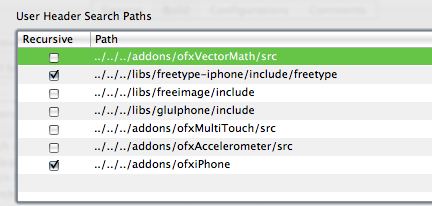
Go to menu Project>Edit Project Settings… and switch to the build tab. Set configuration to “All Configurations” and add in the library and header search paths as appropriate…just like setting up addons.
Set the Overview to Simulator – 2.0 | Debug and try to build. Make sure that all the appropriate libraries have been added to the Target. xcode seems to be able to pick the correct ones for the given architecture.

I initially got an error about a bad BOOL typedef in FreeImage.h:130 I changed it to typedef int8_t BOOL. In perhaps a separate issue, I don’t seem to be able to use the “Boolean” datatype, but can replace it with “bool” instead.
So, that’s what I did to get my system all set up to use openFrameworks with the iPhone. Feel free to let me know how it works out if you use this for yourself. Good luck!
]]>I made a few (simple in hindsight) changes to the project which has worked well for me so far.
Bill of Materials
- Xcode – provided with the Apple Developer Tools
- Arduino IDE – needed for the core libraries for programming the Arduino
- AVR programming tools. Easiest solution is to install the AVRMacPack.
- You can alternatively install avr-gcc, avr-libc, avrdude and libusb via MacPorts or Fink.
- Project Template for Arduino on Xcode.
- For reference: Original source of the ArduinoXcode project template.
Set-up
- Install Xcode. Typically at /Developer
- Install Arduino. Typically at /Applications/arduino-x.xx
Update: Arduino 017+ on OS X is now provided as an application bundle. See below. - Install AVRMacPack. The tools are located at /usr/local/AVRMacPack
- Uncompress the ArduinoOnXcode project template. Move it to /Developer/Library/Xcode/Project Templates/Other/
- Open the Makefile in the ArduinoOnXcode folder. Edit the ARDUINO and AVRDUDE_DIR lines to reflect your system. The default values should work “as is” with this tutorial. Note: for Arduino 017+ change the ARDUINO path to:
/Applications/Arduino.app/Contents/Resources/Java/hardware/cores/arduino
Use
Create a new project in Xcode and select Other>ArduinoOnXcode. You’ll be prompted for a save location for the new project. Select a location and name and click “Save”.
The code for your sketch is written in “main.cpp”. Any custom functions you write will need to be either prototyped at the top of the file where indicated, or will have to be declared before they are used in setup() or loop(). A prototype just indicates the return value and any arguments a function requires. The blink function returns nothing (void) and expects two integer arguments, which is prototyped as: void blink(int n, int d); Again, look at the example code in the template for guidance.
Compiling/Uploading to Arduino
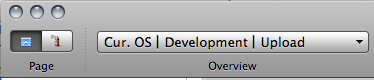
Connect the Arduino via USB. Change the Active Target to “Upload”. The select Build>Clean All Targets. This will compile the code and upload it to the Arduino. The template contains a simple blink sketch to confirm that the process worked.
Serial Terminal
I recall a neat trick to enable easy access to opening a serial terminal through Xcode, but can’t find it now. In the meantime you can use the Terminal.app to open a serial connection to the Arduino:
- Open /Applications/Utilities/Terminal.app
- The the command prompt in the new terminal window type (without the quote marks),
- “screen /dev/tty.usbserial”
- Hit the Tab key. The rest of the serial port’s name should appear. If it doesn’t, verify that the Arduino is plugged in via serial and is powered on.
- For example, the command for my Arduino looks like: “screen /dev/tty.usbserial-A4001Jdl”
- Press return to execute the screen command. The Arduino will reset and should open the serial port.
- You can type to send characters, but there is no local echo (ie. you won’t see the typed characters)
- To exit and close the serial port
- Press Control-A then ‘k’ to “kill” the window. This just stops the screen program and returns to the command prompt.
Of course, you could use ZTerm instead…
Good luck!
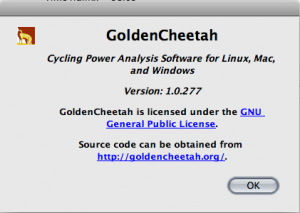 We finally got a new version of Golden Cheetah out the door….it’s been only like, almost a year. Whew! Pressure is off.
I had been making personal builds since the summer to give out to folks who wanted to take advantage off several new features introduced since the march build. Sean gave Justin and I write access to the svn code this past December and we’ve been playing catch up on a backlog of patches, and i’ve been remembering c++ and Qt.
Several new features have been added in this release: Critical Power calculator, find best intervals utility, Pedal Force / Pedal Velocity chart, iBike and Ergomo CSV import, GUI power zones creator, separate vertical axes for Power / HR / Cadence and Speed in the Ride plot, sorting rides with the most recent at the top of the list, and many bug fixes courtesy of JT Conklin. This version is also using FTDI D2xx drivers rather than VCP.
We’ve also switched to a numbered versioning system which will serve to better indicate which svn revision the releases were built from and perhaps will mask our slow release cycle. :)
The new release is available on the Golden Cheetah download page.
]]>justin had done some initial troubleshooting, eventually filing a bug report with trolltech. he determined that the QMAKE_CXXFLAGS = -DGC_BUILD_DATE=”`date +’\”%a_%b_%d,_%Y\”‘`” was causing the issue. commenting out the offending line to get a valid xcode project and having to create another define in a source file.
a dev from trolltech got back to justin confirming the bug and offering a workaround by manually adding the directive in the xcode target’s build settings. they also mentioned that a fix would be coming in a future version of qmake, but gave nothing specific. i spent most of the afternoon trying to follow this workaround to no avail. it was very frustrating. i looked at the project file that qmake created and something looked odd with how special characters in the qmake_cxxflags key were escaped with slashes. too many it seemed.
finally, i came across a forum post where someone was trying to set a define macro to have a string value – jsut what we are trying to do. the solution is somewhat a hack, a bandaid for a shortcoming of qmake… triple-escape the outside quotation marks. looks like: -DGC_BUILD_DATE=\\\”`date +’\”%a_%b_%d,_%Y\”‘`\\\”
it compiles fine on the linux (ubuntu) test box, manually on mac os x (using qmake/make) and also creates a valid (parseable) xcode project file, but it won’t compile in xcode. i still have to disable these lines in src.pro and add them in by manually later. for the time being, i’m planning to develop in xcode, and build test versions without the build date/version number and then compile beta/release versions by hand, which works fine.
for reference, here are the lines i’m referring to in src.pro:
QMAKE_CXXFLAGS += -DGC_BUILD_DATE=\\\"`date +'\"%a_%b_%d,_%Y\"'`\\\"
QMAKE_CXXFLAGS += -DGC_SVN_VERSION=\\\"`svnversion . | cut -f '2' -d ':'`\\\"
QMAKE_CXXFLAGS += -DGC_MAJOR_VER=1
QMAKE_CXXFLAGS += -DGC_MINOR_VER=0
the top two lines are string values; the bottom two values are integers. also note, this has been reported to not work in win32, but i haven’t tested it myself. after we get the mac/linux builds going i’ll get back to the win build.
]]>the winter show went very well – it seemed that cloud reader was well received. most of the favorable comments were split among two categories…those which really liked the performative aspect of the project and could envision it large on a wall….and those who reacted strongly to the intimate aspect of seeing it running on the iPhone screen.
since the project was originally designed for the small screen in ITP’s 2×2 class, the comments were enough to encourage me to finally get around to iPhone application development. i’ve looked over various objective-c, cocoa and iphone docs over the past year, but never really made a commitment to actually learn or apply it. now i’m driven, and have come to love square braces :)
separately and coincidentally, sean from golden cheetah decided to extend justin and i write access to the svn codebase and the website. he’s been quite busy and gc development has stalled for it. although i’ve been busy with school, between the three of us we should be able keep abreast of patches and implement new features.
i’m trying to be cautious with the project…i don’t want to do something that will expose me as a (programming) fraud! justin and i were able to get it working happily in xcode…although the QMAKE_CXXFLAGS += -DGC_BUILD_DATE=”`date +’\”%a_%b_%d,_%Y\”‘`” compiler directive in src.pro was causing qmake to create non-parseable xcodeproj files…i think it may have to do with escaping special characters. justin sent a bug report to Qt…hopefully we’ll hear something at some point…for the time-being i’ve commented out the line in the .pro file and added a conditional define in MainWindow.cpp.
so, tinkering with the golden cheetah code has be getting me comfortable with code that isn’t java and i think i’ll be well on my way to get to with with cloud reader for iphone…come on apple and approve my developer application!
]]>