there was no improvement despite several rounds of optimizing the openGL drawing code and plugging several memory leaks.
finally, in frustration i bumped the explicit frame rate declaration from the default 60 fps to 120 fps. i realize that ofSetFrameRate(60) is merely the upper limit of the frame rate, and that the hardware won’t actually go faster than it can handle, however this immediately improved performance on the 3GS and the first gen is about the same as it was. further improvement was had with a declared frame rate of 240 fps.
i haven’t had a chance to look into the underlying issue, but i believe that oF is using NSTimer under the hood to trigger a scheduled update() and draw(). has there been some change in the SDK there?
]]>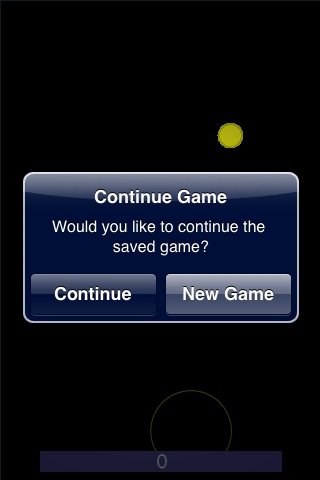 There was a recent comment about saving / restoring application state when using openFrameworks for iPhone which got me to thinking about how to do it. Apple’s frameworks provide a fairly thorough way to save state to the disk and restore later. There seem to be three primary ways to do this: simple plist files (usually encoded in binary on the iPhone), archived data (they like to refer to this as freeze-dried object graphs) and core data.
I believe that archiving objects require methods inherited from NSObject, which we don’t have in openFrameworks’ ofSimpleApp. Core Data seems like overkill, so I looked into using plist files.
There are likely better ways to do this, but this ad-hoc solution works wonderfully for a small app I’m working on, and only requires a bit of Objective-C code that could likely be moved up into a nice wrapper class. However, since the question was asked I’d just like to get it out there before working on a more elegant approach.
The easiest way to store state is with NSUserDefaults. The following returns a pointer to the shared user defaults object then writes several values to it. Adding data to the object will get cached in memory and eventually written to disk (or upon receiving a synchronize message). The key is just a NSString, which can be arbitrarily named, but you’ll need to use identical values to retrieve the data later.
NSUserDefaults *savedData = [NSUserDefaults standardUserDefaults];

[savedData setInteger:score forKey:@"score"];
[savedData setInteger:pointsAvail forKey:@"pointsAvail"];
[savedData setInteger:timeRemaining forKey:@"time"];
[savedData synchronize];
The savedData object should be autoreleased. Plists can handle basic data types such as integer, float, bool and double. Look at the documentation for specific messages, but it’s usually like setFloat:forKey: or setBool:forKey:. It can also handle some NSObjects such as NSString, NSArray and NSDictionary. The selector for those is setObject:forKey:.
Reading back is just as simple. If a key doesn’t exist 0 is returned for a number, and nil for other strings, arrays and dictionaries. In the below example score, pointsAvail and timeRemaining are instance variables of testApp.
NSUserDefaults *savedData = [NSUserDefaults standardUserDefaults];

score = [savedData integerForKey:@"score"];
pointsAvail = [savedData integerForKey:@"pointsAvail"];
timeRemaining = [savedData integerForKey:@"time"];
To get this all working as expected, retrieve the defaults in setup(), and be sure to do some sanity checking if the values aren’t found (ie. if this is the first run of the app). Because we’re mixing Objective-C and C++ in testApp, be sure to rename main.cpp to main.mm, testApp.cpp to testApp.mm and add “#import <UIKit/UIKit.h>” to the top of testApp.mm.
A code snippet from setup():
// test for previous state
NSUserDefaults *savedData = [NSUserDefaults standardUserDefaults];
int hideInstructions = [savedData integerForKey:@"hideInstructions"];

// if the key "hideInstructions" doesn't exist, then it will return 0
if(hideInstructions) {
// we've must have run at least once before and written "hideInstructions"
// restoreGame will read in the rest of the saved values:
restoreGame();
} else {
// assume first run
[savedData setInteger:1 forKey:@"hideInstructions"];
showInstructions();
}
openFrameworks supports an exit() method which gets called dutifully on the iPhone when the application will quit. This is a fine place to write out data to the userDefaults. The challenge as a programmer will be to determine the appropriate data to save and restore. In my simple game, I needed to save the game state for score and time, but also the position and basic state of the widgets on screen. With a larger game I’d look into writing methods into my objects cough up their own important data and then request it when the app is exiting. Keep in mind that there is a narrow window of time that the iPhone OS provides between receiving a signal to quit and when it will forcefully quit your app (like a few seconds) so saving data needs to happen quickly.
This method is purposefully rudimentary, but I think it works well for this particular use.
]]>Quite a few folks mentioned that they have become interested in openFrameworks after hearing about it’s use for creating iPhone applications. While not every app is suitable, I saw a few really nice examples. My only regret is not getting the name of the fellow who was working with creating a sound wrapper.
The wiki page for the knitting circle is at the openFrameworks wiki.
]]>Feel free to let me know how I can do things better, or just tinker with the code directly at github: ofxiPhoneWrappers
Check out the example project. This is a bit of a kludge. I would like to figure out how to avoid having to declare main and testApp as mixed source files (.mm). It works for now, however.
Here are the notes on using the class:
// ofxiPhoneAlertView:
// setup the list of buttons
vector<string> otherButtons;
otherButtons.push_back("Button 1");
otherButtons.push_back("Button 2");
// the args are: title, message, cancel button title ("" == omitted), vector of other button titles
ofxiPhoneAlertView *alert = new ofxiPhoneAlertView("Title,"Here is the alert message.","",otherButtons);
// display the alert view
alert->show();

// I'm using the following methods in update()
// test if the alert is visible (bool):
alert->isVisible();

// test if the alert has been dismissed:
alert->isDismissed();

// get the selected button (int):
alert->getSelectedButton();

// if you use several alerts, you can distinguish between them via their title:
alert->getTitle();

// example logic:
switch(alert->getSelectedButton()){
case -1:
// cancel, or no selection
printf("alert = -1");
break;
case 0:
// first, non-cancel button
printf("alert = 0");
break;
case 1:
// next button. will be the second button after Cancel
printf("alert = 1, ok");
break;
}
ofxiPhoneAlertView.h
/*
ofxiPhoneAlertView.h

Created on 6/10/09.
Copyright 2009 Robert Carlsen | robertcarlsen.net

This program is free software: you can redistribute it and/or modify
it under the terms of the GNU General Public License as published by
the Free Software Foundation, either version 3 of the License, or
(at your option) any later version.

This program is distributed in the hope that it will be useful,
but WITHOUT ANY WARRANTY; without even the implied warranty of
MERCHANTABILITY or FITNESS FOR A PARTICULAR PURPOSE.  See the
GNU General Public License for more details.

You should have received a copy of the GNU General Public License
along with this program.  If not, see <http://www.gnu.org/licenses/>.

*/

#import <UIKit/UIKit.h>
#import "ofMain.h"

@interface ofxiPhoneAlertViewDelegate : UIAlertView <UIAlertViewDelegate>
{
UIAlertView*			_alertView;
int                     selectedButton;
bool                    dismissed;
}

- (id)initWithTitle:(NSString *)title message:(NSString *)message cancelButtonTitle:(NSString *)cancelButtonTitle otherButtonTitles:(NSArray *)otherButtonTitles;

-(int)getButton;
-(bool)isDismissed;
-(string)getTitle;

@end

class ofxiPhoneAlertView
{
public:
ofxiPhoneAlertView(string title, string message, string cancelButtonTitle, vector<string> otherButtonTitles);
~ofxiPhoneAlertView();

void show();
int getSelectedButton();
bool isVisible();
bool isDismissed();
string getTitle();

protected:
ofxiPhoneAlertViewDelegate *alertViewDelegate;
};
ofxiPhoneAlertView.mm
/*
ofxiPhoneAlertView.mm

Created on 6/10/09.
Copyright 2009 Robert Carlsen | robertcarlsen.net

This program is free software: you can redistribute it and/or modify
it under the terms of the GNU General Public License as published by
the Free Software Foundation, either version 3 of the License, or
(at your option) any later version.

This program is distributed in the hope that it will be useful,
but WITHOUT ANY WARRANTY; without even the implied warranty of
MERCHANTABILITY or FITNESS FOR A PARTICULAR PURPOSE.  See the
GNU General Public License for more details.

You should have received a copy of the GNU General Public License
along with this program.  If not, see <http://www.gnu.org/licenses/>.
*/

#include "ofxiPhoneAlertView.h"

// c++ class methods
ofxiPhoneAlertView::ofxiPhoneAlertView(string _title,
string _message,
string _cancelButtonTitle,
vector<string> _otherButtonTitles){
NSString * title = [[[NSString alloc] initWithCString: _title.c_str()] autorelease];
NSString * message = [[[NSString alloc] initWithCString: _message.c_str()] autorelease];

// nil value will omit button
NSString * cancelButtonTitle;
if(_cancelButtonTitle == "")
cancelButtonTitle = nil;
else
cancelButtonTitle = [[[NSString alloc] initWithCString: _cancelButtonTitle.c_str()] autorelease];

// the other buttons are an array of strings
NSMutableArray *otherButtons = [NSMutableArray array];
for(int i=0;i<_otherButtonTitles.size();i++){
[otherButtons addObject:[[[NSString alloc] initWithCString: _otherButtonTitles[i].c_str()] autorelease]];
}

alertViewDelegate = [[ofxiPhoneAlertViewDelegate alloc] initWithTitle:title
message:message
cancelButtonTitle:cancelButtonTitle
otherButtonTitles:otherButtons];

}

ofxiPhoneAlertView::~ofxiPhoneAlertView(){
[alertViewDelegate release];
}

void ofxiPhoneAlertView::show(){
[alertViewDelegate show];
}

int ofxiPhoneAlertView::getSelectedButton(){
return [alertViewDelegate getButton];
}

bool ofxiPhoneAlertView::isVisible(){
return [alertViewDelegate isVisible];
}

bool ofxiPhoneAlertView::isDismissed(){
return [alertViewDelegate isDismissed];
}

string ofxiPhoneAlertView::getTitle(){
return [alertViewDelegate getTitle];
}

// obj-c implementation
@implementation ofxiPhoneAlertViewDelegate

- (id)initWithTitle:(NSString *)title message:(NSString *)message cancelButtonTitle:(NSString *)cancelButtonTitle otherButtonTitles:(NSArray *)otherButtonTitles
{
if (self = [super initWithTitle:title
message:message
delegate:self
cancelButtonTitle:cancelButtonTitle
otherButtonTitles:nil ]){
_alertView = [[ofxiPhoneAlertViewDelegate alloc] initWithTitle:title
message:message
delegate:self
cancelButtonTitle:cancelButtonTitle
otherButtonTitles:nil ];
for(NSString *s in otherButtonTitles){
[_alertView addButtonWithTitle:s];
[self addButtonWithTitle:s];
}

dismissed = false;
//self = [_alertView copy];
}
return self;
}

-(int)getButton{
return selectedButton;
}

-(bool)isDismissed{
return dismissed;
}

-(string)getTitle{
// return the title of the alert. to differentiate between separate alert views
return [[self title] UTF8String];
}

/*
- (void)dismissWithClickedButtonIndex:(NSInteger)buttonIndex animated:(BOOL)animated;
{

}
*/
// Called when a button is clicked. The view will be automatically dismissed after this call returns
- (void)alertView:(UIAlertView *)alertView clickedButtonAtIndex:(NSInteger)buttonIndex
{
selectedButton = buttonIndex;
dismissed = true;
NSLog(@"Selected button: %d",selectedButton);
}

/*
// Called when we cancel a view (eg. the user clicks the Home button). This is not called when the user clicks the cancel button.
// If not defined in the delegate, we simulate a click in the cancel button
- (void)alertViewCancel:(UIAlertView *)alertView;

- (void)willPresentAlertView:(UIAlertView *)alertView;  // before animation and showing view
- (void)didPresentAlertView:(UIAlertView *)alertView;  // after animation

- (void)alertView:(UIAlertView *)alertView willDismissWithButtonIndex:(NSInteger)buttonIndex; // before animation and hiding view
- (void)alertView:(UIAlertView *)alertView didDismissWithButtonIndex:(NSInteger)buttonIndex;  // after animation
*/

-(void) dealloc{
[_alertView release];
[super dealloc];
}

@end
]]>I did a presentation titled “Using openFrameworks for iPhone App Development” which I think went well, although it was quite dense. Can’t be helped, I suppose. The walk-through of getting set up with openFrameworks has been previously posted, and is also available on ITPedia. Below is an embedded video of the presentation thanks to Mark B… and New Work City.
This is an overview of getting set up using openFrameworks for iPhone development.
What is openFrameworks?
openFrameworks is a “a C++ library for creative coding”. It shares a similar philosophy with Processing (as a library for Java). The intended audience “are folks using computers for creative, artistic expression, and who would like low level access to the data inside of media in order manipulate, analyze or explore.”
There are good resources for reading more about it below, under the Resources heading. This article assumes basic knowledge of programming and of the Xcode development environment. You can simply follow along and launch the demo app, but you should really read the resources to understand the structure of a typical openFrameworks-based application.
Why?
iPhone native application development is typically done in Objective-C. Not pressing the merits and detractions of Obj-C, but it’s *another* language to learn. If you have code / experience working in C++ then you can use oF to migrate those programs to the iPhone somewhat painlessly. Arguably easier to begin working with – espeically if you’re coming from experience with Processing.
Why not?
However, if you already develop in Objective-C, then maybe you don’t need to use oF. OpenFrameworks is not as well documented as Objective-C (even though Apple’s docs are as dense as the proverbial stereo instructions joke). Certain applications are not as suitable (lots of hierarchal views) It’s very easy to overwhelm the iPhone if porting desktop oF code over.
Ultimately, however, this eliminates 90% of Obj-C. Still need to use Obj-C (or Obj-C++) to use iPhone interface widgets. Don’t worry about it right now.
Credit
The openFrameworks team did great work under the hood of version 006 to enable this. ofxiphone was compiled by Lee Byron, Memo Akten, Damian Stewart, Zach Gage, and the core OF team (Zach, Theo, and Arturo).
Resources
Get the necessary software for development.
- iPhone development tools
- http://developer.apple.com/iphone/ – create (free) iPhone developer account / get iPhone SDK (includes Xcode)
- openFrameworks
- http://www.openframeworks.cc/download – iPhone version
- Start reading
Basic set-up
- Install openFrameworks in the Developer folder (out of habit)
- oF examples live inside the “of_preRelease_v0.06_iphone/apps/examples” folder
- You can create an alternative folder within “apps” for your work (I use “sketchbook”)
- Tip! Install one of the example projects in the Xcode template directory
- “/Developer/Library/Xcode/Project Templates/Other”
- You can then start a new project at File>New Project… then select Other in the left panel.
- Alternative Tip! Install Memo’s openFrameworks project templates
- Download the templates.
- Unzip the file and copy the openFrameworks folder to:
- “/Developer/Library/Xcode/Project Templates/”
Example Application
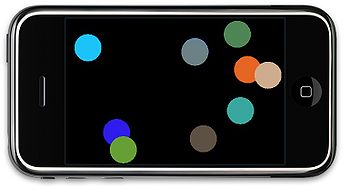
- Memo’s simple demo
- Improved demo – based on the Touch+Accel demo in the examples folder.
- Enables multitouch – select up to five objects at once
- Can toss objects around screen.
- Download the demo code. (remember to install in apps/sketchbook)
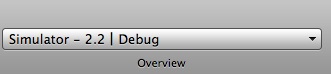
- Select the Simulator in the Active SDK target menu:
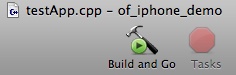
- Select Build and Go to compile, install in the Simulator and launch the app:
Important bits. The include lines in testApp.h enable the iPhone-specific methods:
#include "ofMain.h"
#include "ofxMultiTouch.h"
#include "ofxAccelerometer.h"
Initialize multitouch and accelerometer in testApp::setup() in testApp.cpp:
ofxAccelerometer.setup();
ofxMultiTouch.addListener(this);
ofxMultiTouch provides the following methods:
void touchDown(float x, float y, int touchId, ofxMultiTouchCustomData *data = NULL);
void touchMoved(float x, float y, int touchId, ofxMultiTouchCustomData *data = NULL);
void touchUp(float x, float y, int touchId, ofxMultiTouchCustomData *data = NULL);
void touchDoubleTap(float x, float y, int touchId, ofxMultiTouchCustomData *data = NULL);
touchId is an identifier of which touch in the current set of multiple touches is currently being evaluated. The Thing class in the demo has an instance variable which stores this, so the object knows which touch it should be responding to.
Currently ofxMultiTouchCustomData is just a struct with the total number of touches in the current set. For example:
if( data->numTouches >= 2 ) {
   // do stuff only when two (or more) touches are down
}
ofxAccelerometer.getForce() returns an ofPoint (x,y,z) of the current force.
Starting a new Project
- Create a new Project (using above template picker)
- Save the project in the apps/sketchbook folder with a unique name
- Change the Application name (“oF iPhone” by default)
- Select the Target “iPhone oF” from the “Groups & Files” panel on the left
- File>Get Info
- Select the Build tab
- Scroll down to “Product Name” and customize it as desired. Be aware that long names will be truncated in the iPhone Springboard
- Customization
- Change Default.png and Icon.png in the data folder.
Modify testApp.h and testApp.cpp as necessary. Feel free to build out extra classes as your project needs them.
Installing on Device
You need to get a paid ($99 annually) iPhone Developer Account to install any software on the device, even your own for development. Follow instructions on the iPhone Developer Program Portal. (Somewhat confusing at first-pass)
- Generate a development certificate
- Register your device
- Create an App ID (you can use a wildcard for development of several apps: com.yourname.* )
- Provision your device
Again, follow the instructions on the Portal.
- Project changes for Device installation:
- Change Info.plist – add App ID (com. yourname.*)
- Select the Target > Get Info > Code Signing. Change to your certificate (iPhone Developer: yourname)
- Device Provisioning. Drag the downloaded device provisioning file onto the Xcode Organizer.
Adding UIKit elements
Download the above multitouch demo with a UIView added for preferences.
You can combine both C++ and Objective-C into one file.
- Add the UIKit headers to testApp.h:
#import <UIKit/UIKit.h>
- Change the file extension of main.cpp and testApp.cpp to .mm (as well as any other custom classes that include both).
- Easiest to change the file names in the Finder, drag the renamed files back into Xcode then remove the .cpp files (should be red)
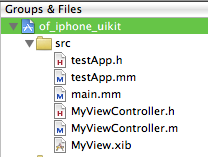
Best practice seems to be to add a UIView (or UIViewController’s view) as a subview of the application’s window. The window is accessible by:
[[UIApplication sharedApplication] keyWindow]
The demo uses a subclass of UIViewController called MyViewController to load an Interface Builder created view. In testApp::setup():
// for the UIView GUI stuff:
myViewController = [[MyViewController alloc] initWithNibName:@"MyView" bundle:nil];
Important! MyView.xib needs to be aware of it’s UIViewController, called MyViewController in the demo. This sounds a bit confusing, but is straightforward – follow along with the screenshots below.
- Set the Class property of File’s Owner to MyViewController:

- Then connect the File’s Owner view outlet to the UIView’s view property:
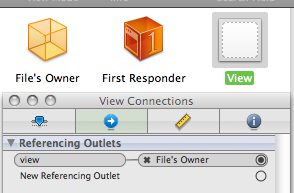
- Display the view by inserting the view into the window (this is in testApp.mm):
[[[UIApplication sharedApplication] keyWindow] addSubview:myViewController.view];
- Dismiss it by removing the view from the window (also in testApp.mm):
[myViewController.view removeFromSuperview];
- The demo actually uses a method in the view controller to remove itself, which looks like (MyViewController.m):
[[self view] removeFromSuperview];
- You can also add animated transitions and all the other UIKit goodies…but that’s for another day.
- You can use standard IBOutlet and IBAction objects to send signals between your view controls and program logic. That is outside of the scope of this overview. So is the Model-View-Controller (MVC) paradigm…but I’d create a singleton data object…and have your view controller and testApp classes access it…if I were you, and all.
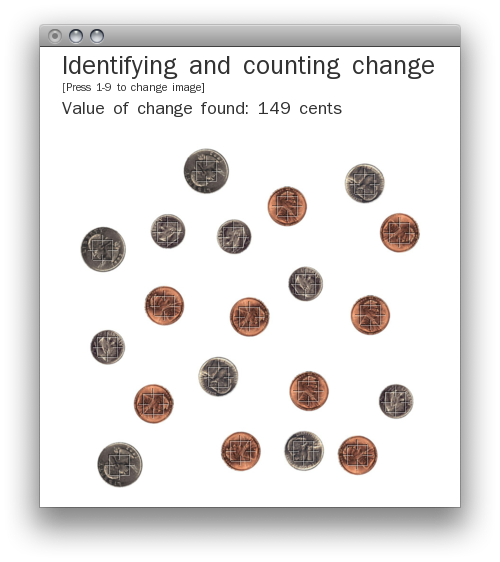
As an in-class exercise for Spatial Media we were asked to develop a program which would identify coins in a series of supplied images and tally up their total value. In one hour.
Since time was limited, I decided to use pixel count as a rough estimate of each coin’s size. This works very reliably with the sample set of images, but that’s likely because the images consist of duplicated coins and are on a solid white background. Several additional methods wold likely need to be implemented to deal with actual situations. (Code below)
Nevertheless, simple thresholding isolates the coins from the background and a seed fill algorithm identifies separate objects. The size of each found object is compared against calibrated values and the coin’s identity/value is inferred from that.
It was a fun (for me) challenge to develop the program in a limited time. I did spend some time after class cleaning up the display and implementing an interactive method to change the image for analysis.
Code (oF xcode project): ofCountingChange.zip
]]> I’ve had a few days to test the libraries I cobbled together for using openFrameworks with iPhone and also received positive reports from some folks who tried out the Makefiles I provided to them, so here they are for anyone who’s willing to try them out. -please make these instructions better if you see fit-
Update (7.8.2009): Fixed some errant quote mark substitutions in the freetype configure line. Also corrected a tab formatting error in the freeimage makefile.
Ok, here goes. This is going to be a work-in-progress document. Of course, there are no promises with this and your mileage may vary…but it’s been working for me. Please report success (and trouble, hopefully with workarounds).
The basic “tutorial” I followed is on Memo Akten’s blog, memo.tv
I’d highly suggest following Memo’s tutorial for setting up the development environment. However, there are three libraries that he mentions in his article that need to be built for the iPhone specifically: glu, freetype and freeimage. Although he mentions that they have been ported to iPhone I wasn’t able to locate binaries of the libraries, and went through the process of cross-compiling them myself. This post documents what I needed to do to accomplish that.
You’ll need to download the source for each of the libraries listed above, as well as a svn copy of open frameworks plus the ofxiPhone, ofxMultiTouch and ofxAccelerometer addons. I preferred to use ofx-dev which bundled this and many more addons. You also need the Apple Developer Tools including Xcode and the iPhone SDK.
GLU for iPhone:
The glu for iphone package builds painlessly. Build twice: once for the iPhone, once for the iPhone Simulator. Make sure to do a “make clean” before building the second version. The readme explains the make command. I copied the entire folder to ofx-dev/libs/gluiphone
The other two were more difficult for me. I’ve never cross-compiled, so perhaps that contributed to the trouble I had.
FreeImage:
Here is the makefile that I came up with, based on the existing files and what I saw in the glu makefile. Copy the makefile listed below as “Makefile.iphone” alongside the others in the source directory, then run “make -f Makefile.iphone”. This should build both the iPhone and iPhone Simulator libraries into the “Dist” folder. Copy both files to ofx-dev/libs/freeimage/lib
# Configuration for iPhone OS, making static libs
# this will generate both iPhone (arm) and iPhoneSimulator (i686) libs

include Makefile.srcs

CFLAGS =  -g -O2 -Wall -Wmissing-prototypes -std=c99 -ffast-math -fno-strict-aliasing
CXXFLAGS =  -g -O2 -Wall -fno-strict-aliasing

GCC_VERSION = 4.0
IPHONEOS_DEPLOYMENT_TARGET = 2.1
MACOSX_DEPLOYMENT_TARGET = 10.5

PLATFORM_SIM = iPhoneSimulator
PLATFORM_PHONE = iPhoneOS

ARCH_SIM = i686
ARCH_PHONE = armv6

PLATFORM_SIM_DEVELOPER_BIN_DIR = /Developer/Platforms/$(PLATFORM_SIM).platform/Developer/usr/bin
PLATFORM_PHONE_DEVELOPER_BIN_DIR = /Developer/Platforms/$(PLATFORM_PHONE).platform/Developer/usr/bin

SDKROOT_SIM = /Developer/Platforms/$(PLATFORM_SIM).platform/Developer/SDKs/$(PLATFORM_SIM)$(IPHONEOS_DEPLOYMENT_TARGET).sdk
SDKROOT_PHONE = /Developer/Platforms/$(PLATFORM_PHONE).platform/Developer/SDKs/$(PLATFORM_PHONE)$(IPHONEOS_DEPLOYMENT_TARGET).sdk

EXTRA_CFLAGS_SIM += -arch $(ARCH_SIM) -pipe -mdynamic-no-pic -fvisibility=hidden $(INCLUDE) -isysroot $(SDKROOT_SIM)
EXTRA_LDFLAGS_SIM += -arch $(ARCH_SIM) -isysroot $(SDKROOT_SIM) -Wl,-dead_strip
EXTRA_CFLAGS_SIM += -D__IPHONE_OS_VERSION_MIN_REQUIRED=20000 -mmacosx-version-min=$(MACOSX_DEPLOYMENT_TARGET)
EXTRA_LDFLAGS_SIM += -mmacosx-version-min=$(MACOSX_DEPLOYMENT_TARGET)

EXTRA_CFLAGS_PHONE += -arch $(ARCH_PHONE) -pipe -mdynamic-no-pic -fvisibility=hidden $(INCLUDE) -isysroot $(SDKROOT_PHONE)
EXTRA_LDFLAGS_PHONE += -arch $(ARCH_PHONE) -isysroot $(SDKROOT_PHONE) -Wl,-dead_strip
EXTRA_CFLAGS_PHONE += -miphoneos-version-min=$(IPHONEOS_DEPLOYMENT_TARGET)
EXTRA_LDFLAGS_PHONE += -miphoneos-version-min=$(IPHONEOS_DEPLOYMENT_TARGET)

AR_SIM = $(PLATFORM_SIM_DEVELOPER_BIN_DIR)/ar
AR_PHONE = $(PLATFORM_PHONE_DEVELOPER_BIN_DIR)/ar

CC_SIM = $(PLATFORM_SIM_DEVELOPER_BIN_DIR)/gcc-$(GCC_VERSION)
CC_PHONE = $(PLATFORM_PHONE_DEVELOPER_BIN_DIR)/gcc-$(GCC_VERSION)

CFLAGS_SIM = $(CFLAGS) $(EXTRA_CFLAGS_SIM)
LDFLAGS_SIM = $(EXTRA_LDFLAGS_SIM)
CXX_SIM = $(PLATFORM_SIM_DEVELOPER_BIN_DIR)/g++-$(GCC_VERSION)
CXXFLAGS_SIM += $(EXTRA_CFLAGS_SIM) -fvisibility-inlines-hidden
LIBTOOL_SIM = /Developer/Platforms/$(PLATFORM_SIM).platform/Developer/usr/bin/libtool

CFLAGS_PHONE = $(CFLAGS) $(EXTRA_CFLAGS_PHONE)
LDFLAGS_PHONE += $(EXTRA_LDFLAGS_PHONE)
CXX_PHONE = $(PLATFORM_PHONE_DEVELOPER_BIN_DIR)/g++-$(GCC_VERSION)
CXXFLAGS_PHONE += $(EXTRA_CFLAGS_PHONE) -fvisibility-inlines-hidden
LIBTOOL_PHONE = /Developer/Platforms/$(PLATFORM_PHONE).platform/Developer/usr/bin/libtool

TARGET = freeimage
STATICLIB_SIM = lib$(TARGET)-iphonesimulator.a
STATICLIB_PHONE = lib$(TARGET)-iphone.a
HEADER = Source/FreeImage.h

.SUFFIXES: .o-i686 .o-arm
MODULES_ARM = $(SRCS:.c=.o-arm)
MODULES_ARM := $(MODULES_ARM:.cpp=.o-arm)
MODULES_i686 = $(SRCS:.c=.o-i686)
MODULES_i686 := $(MODULES_i686:.cpp=.o-i686)

default: all

all: dist

dist: FreeImage
	cp *.a Dist
	cp Source/FreeImage.h Dist

FreeImage: $(STATICLIB_SIM) $(STATICLIB_PHONE)

$(STATICLIB_SIM): $(MODULES_i686)
	$(LIBTOOL_SIM) -arch_only i686 -o $@ $(MODULES_i686)

.c.o-i686:
	$(CC_SIM) $(CFLAGS_SIM) -c $< -o $@

.cpp.o-i686:
	$(CXX_SIM) $(CXXFLAGS_SIM) -c $< -o $@

$(STATICLIB_PHONE): $(MODULES_ARM)
	$(LIBTOOL_PHONE) -arch_only armv6 -o $@ $(MODULES_ARM)

.c.o-arm:
	$(CC_PHONE) $(CFLAGS_PHONE) -c $< -o $@

.cpp.o-arm:
	$(CXX_PHONE) $(CXXFLAGS_PHONE) -c $< -o $@

clean:
	rm -f core Dist/*.* u2dtmp* $(MODULES_i686) $(MODULES_ARM) $(STATICLIB_SIM) $(STATICLIB_PHONE)
FreeType:
Their makefile situation got me all confused so i just passed command like configure arguments as necessary. This is pretty ugly. -Please make this better someone-
#building freetytpe for iphone
# for iPhone
./configure --prefix=/usr/local/iphone --host=arm-apple-darwin --enable-static=yes --enable-shared=no CC=/Developer/Platforms/iPhoneOS.platform/Developer/usr/bin/arm-apple-darwin9-gcc-4.0.1 CFLAGS="-arch armv6 -pipe -mdynamic-no-pic -std=c99 -Wno-trigraphs -fpascal-strings -fasm-blocks -O0 -Wreturn-type -Wunused-variable -fmessage-length=0 -fvisibility=hidden -miphoneos-version-min=2.0 -gdwarf-2 -mthumb -I/Developer/Platforms/iPhoneOS.platform/Developer/SDKs/iPhoneOS2.0.sdk/usr/include/libxml2 -isysroot /Developer/Platforms/iPhoneOS.platform/Developer/SDKs/iPhoneOS2.0.sdk" CPP=/Developer/Platforms/iPhoneOS.platform/Developer/usr/bin/cpp AR=/Developer/Platforms/iPhoneOS.platform/Developer/usr/bin/ar LDFLAGS="-arch armv6 -isysroot /Developer/Platforms/iPhoneOS.platform/Developer/SDKs/iPhoneOS2.0.sdk -Wl,-dead_strip -miphoneos-version-min=2.0"

# for iPhone simulator
./configure --prefix=/usr/local/iphone --enable-static=yes --enable-shared=no CC=/Developer/Platforms/iPhoneSimulator.platform/Developer/usr/bin/gcc-4.0 CFLAGS="-arch i686 -pipe -mdynamic-no-pic -std=c99 -Wno-trigraphs -fpascal-strings -fasm-blocks -O0 -Wreturn-type -Wunused-variable -fmessage-length=0 -fvisibility=hidden -mmacosx-version-min=10.5  -I/Developer/Platforms/iPhoneSimulator.platform/Developer/SDKs/iPhoneSimulator2.0.sdk/usr/include/ -isysroot /Developer/Platforms/iPhoneSimulator.platform/Developer/SDKs/iPhoneSimulator2.0.sdk" CPP=/Developer/Platforms/iPhoneSimulator.platform/Developer/usr/bin/cpp AR=/Developer/Platforms/iPhoneSimulator.platform/Developer/usr/bin/ar LDFLAGS="-arch i686 -isysroot /Developer/Platforms/iPhoneSimulator.platform/Developer/SDKs/iPhoneSimulator2.0.sdk -Wl,-dead_strip -mmacosx-version-min=10.5"
Run one of the configure lines, then make. I got an error about “asm” being undefined…I think it was in include/freetype/config/ftconfig.h. Change “asm” to “__asm__” (that’s two underscores for both prefix and suffix). If it works then it drops the lib in a hidden dir: “./objs/.libs”. Copy the static lib out of there and rename it as appropriate. i’m using libfreetype-iphone.a and libfreetype-iphonesimulator.a. Run make clean and then run the other configure line and make again. There were some headers missing in from the freetype lib provided with ofx-dev that I noticed in the example ofxiPhone aps…so I copied the entire freetype folder to ofx-dev/libs/freetype-iphone. I put the libraries into freetype-iphone/lib so i could keep everything straight when setting up xcode.
Ok, I think this gets up to the point where we can set up xcode.
 Copy one of the ofxiPhone examples to ofx-dev/apps/dev and open it up in xcode. I used the Graphics example. There is some more explanation on Memo’s site about the project structure, but it was very similar to adding any other addons. However, I put gluiphone, freetype-iphone and freeimage into the libs>core>core libraries package in the xcode project. I’ve attached a screenshot to illustrate better than i can explain. (ofxVectorMath is there for the specific project i have open, is not required).
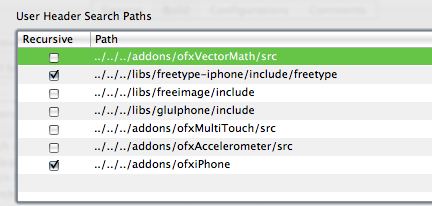
Go to menu Project>Edit Project Settings… and switch to the build tab. Set configuration to “All Configurations” and add in the library and header search paths as appropriate…just like setting up addons.
Set the Overview to Simulator – 2.0 | Debug and try to build. Make sure that all the appropriate libraries have been added to the Target. xcode seems to be able to pick the correct ones for the given architecture.

I initially got an error about a bad BOOL typedef in FreeImage.h:130 I changed it to typedef int8_t BOOL. In perhaps a separate issue, I don’t seem to be able to use the “Boolean” datatype, but can replace it with “bool” instead.
So, that’s what I did to get my system all set up to use openFrameworks with the iPhone. Feel free to let me know how it works out if you use this for yourself. Good luck!
]]> I’ve heard about openFrameworks 0.6 (as of yet unreleased) and specifically efforts to support building apps using oF for the iPhone. There are a few developers who have published videos of their efforts and even several apps in the AppStore.
Memo Atken has a very informative article about setting up the prerelease 0.6 version for use with the ofxiPhone addon. However, there is a HUGE simplification of the steps necessary for getting the supporting libraries installed for use with iPhone.
Update: freetype/freeimage building instructions have been posted.
GLU, FreeType and FreeImage need to be built for use with the iPhone. GLU has a nice iPhone specific project and worked flawlessly. I looked around to see if there were ARM/iPhone built versions of the FreeImage and FreeType libraries already available, but couldn’t find anything. In the end, I hacked up their respective Makefiles and configure options and eventually got everything compiled. I’ve never had to manually cross-compile code, and I don’t *actually* know what I’m doing…but I can sure copy-paste like a fiend.
Eventually, I’ll post the specific changes I made, but I want to test it a bit before I expose my embarrassing level of hackery. In the meantime let me know if you’re itching to get your own environments set up and I’ll do what I can.
For my “hello world” app I ported the particle system from the TrafficFlow project over to the iPhone. It was originally written using oF 0.5 and c++ in xcode, so it was relatively trivial to update for the iPhone with the ofxiPhone addon. I’m using ofx-dev as the codebase. Using the built-in multi touch library sure beats building the computer vision tracking we’re using for the table! Teaser video below.
]]> Ameya and I presented the prototype of TrafficFlow yesterday at ITP for our Spatial Media midterm project. It is an installation-based table which visualizes wireless traffic on a local network as gracefully flowing rivers of light.
Each user on a network has an individual connection to the internet and may have a conceptual model of personalized “tube”. However, all traffic on a typical network shares the same infrastructure and commingles at some point, and if unencrypted, is available to any other member of the network. TrafficFlow aims to make visible this hidden connection.
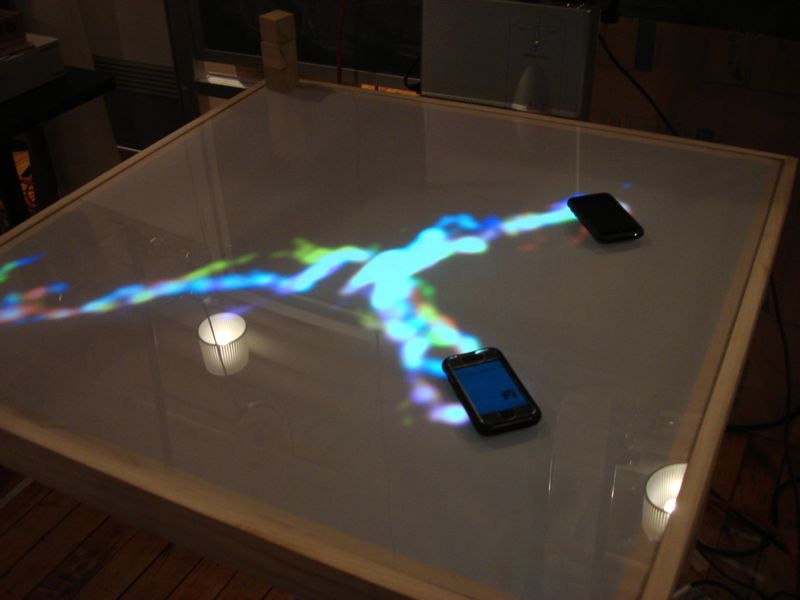 Connecting to the table’s public network begins the process. The user is directed to a welcome page and asked to place their device on the table, which creates a glowing circle around it. After the table detects the device, they are prompted to confirm that the highlighted device is theirs. As soon as they affirm their connection the circle disappears and their traffic begins to flow.
Reactions to the table varied, but people liked the aesthetic of the flowing light. Several people thought that the lights were too organic to represent digital data. Ameya and I discussed this point but feel that we wanted to stay away from a hard edged, bit-based visual. Instead we are looking to show the data as energy, something almost alive. Another observation is that people really enjoyed manipulating the light with their hands in demo mode without the back end of the data representation. That is certainly something to consider.
 The prototype still needs significant work in making the device capturing more robust, but the proof-of-concept is functional – and is demonstrated in the below video. Without getting too technical, the system uses several separate systems to function. A router with a custom Linux firmware based on DD-WRT handles the network connections, captive portal and packet sniffing. A java applet and php script parses the packet output and provides web-based activation which populates a mysql database. The main application is written in C++ using the openFrameworks, openCV and mysql++ libraries. Ameya did the web and database stuff and I focused on the visualization/camera vision software. This is the most extensive software that I’ve written so far, but it’s been worth the work.
 The table was custom built by several of us in the Spatial Media class. It has a plexiglass surface with a sheet of mylar for diffusion. It provided for under sensing with an IR camera and under projection, using a mirror to bounce the image off the floor. For most of us it was the first interactive surface that we’ve worked with and was challenging. The results of the prototype table are somewhat frustrating, but I think it could be made much more robust with more refinement. A good learning experience.
Enjoy the videos.
]]>