<?xml version="1.0" encoding="UTF-8"?>
<rss version="2.0"
	xmlns:content="http://purl.org/rss/1.0/modules/content/"
	xmlns:wfw="http://wellformedweb.org/CommentAPI/"
	xmlns:dc="http://purl.org/dc/elements/1.1/"
	xmlns:atom="http://www.w3.org/2005/Atom"
	xmlns:sy="http://purl.org/rss/1.0/modules/syndication/"
	xmlns:slash="http://purl.org/rss/1.0/modules/slash/"
	>

<channel>
	<title>exploration &#187; processing</title>
	<atom:link href="http://robertcarlsen.net/tag/processing/feed" rel="self" type="application/rss+xml" />
	<link>http://robertcarlsen.net</link>
	<description>accounts of success and misadventure</description>
	<lastBuildDate>Tue, 13 Jul 2010 14:37:06 +0000</lastBuildDate>
	<generator>http://wordpress.org/?v=2.8.4</generator>
	<language>en</language>
	<sy:updatePeriod>hourly</sy:updatePeriod>
	<sy:updateFrequency>1</sy:updateFrequency>
			<item>
		<title>&#8230;of course i was logging</title>
		<link>http://robertcarlsen.net/2010/02/10/of-course-i-was-logging-1098</link>
		<comments>http://robertcarlsen.net/2010/02/10/of-course-i-was-logging-1098#comments</comments>
		<pubDate>Thu, 11 Feb 2010 03:11:09 +0000</pubDate>
		<dc:creator>Robert</dc:creator>
				<category><![CDATA[itp]]></category>
		<category><![CDATA[ankle]]></category>
		<category><![CDATA[csv]]></category>
		<category><![CDATA[datalogging]]></category>
		<category><![CDATA[graph]]></category>
		<category><![CDATA[iphone]]></category>
		<category><![CDATA[processing]]></category>
		<category><![CDATA[snowboard]]></category>
		<category><![CDATA[visualization]]></category>

		<guid isPermaLink="false">http://robertcarlsen.net/?p=1098</guid>
		<description><![CDATA[I fractured my ankle in a hard snowboard crash a couple of weeks ago and of course I was data logging the accelerometer forces. I was using the iPhone app developed last fall for the seismi{c}ycling project; while riding the phone was in my jacket&#8217;s internal chest pocket.
A group from ITP was enjoying the bitter [...]]]></description>
			<content:encoded><![CDATA[<p><a href="http://robertcarlsen.net/blog/wp-content/uploads/2010/02/Screen-shot-2010-01-30-at-20.12.55-.png" rel="lightbox[1098]"><img class="alignright size-thumbnail wp-image-1099" title="Screen shot 2010-01-30 at 20.12.55" src="http://robertcarlsen.net/blog/wp-content/uploads/2010/02/Screen-shot-2010-01-30-at-20.12.55--150x150.png" alt="Screen shot 2010-01-30 at 20.12.55" width="150" height="150" /></a>I fractured my ankle in a hard snowboard crash a couple of weeks ago and of course I was data logging the accelerometer forces. I was using the iPhone app developed last fall for the seismi{c}ycling project; while riding the phone was in my jacket&#8217;s internal chest pocket.</p>
<p>A group from ITP was enjoying the bitter weather at Mount Snow, in West Dover, VT on our (now annual?) Snowbunnies trip. This crash was late in the day on a wide open trail. I accidentally disengaged my heelside edge for a moment, causing me to rotate slightly clockwise and slide laterally. Moments later, my heelside edge caught again, now on the downhill side, causing me to quickly flip backwards onto my head &#8230; thankfully I was wearing a helmet. After that I can&#8217;t recall what exactly happened, but I know that it involved a lot of tumbling which my right ankle just couldn&#8217;t weather.<span id="more-1098"></span></p>
<p>The data was recorded at 10Hz and includes GPS coordinates, heading, estimated speed and altitude and the accelerometer values. I used a simple java / processing application to graph the log. In the video clip below I&#8217;ve applied low pass filtering to the raw acc data and used that to control a 3d box, representing my orientation during the crash.</p>
<p>The log file is included here in CSV format if anyone wants to check it out or make an awesome visualization of it! There is some weirdness at the beginning of the file&#8230;perhaps as Core Location was getting a GPS fix. [<a href="http://robertcarlsen.net/blog/wp-content/uploads/2010/02/crashlog.zip">crash datalog</a>]</p>
<p><object width="425" height="344"><param name="movie" value="http://www.youtube.com/v/cXQ99o6O_30&#038;fs=1" /><param name="allowFullScreen" value="true" /><param name="allowscriptaccess" value="always" /><embed src="http://www.youtube.com/v/cXQ99o6O_30&#038;fs=1" type="application/x-shockwave-flash" allowscriptaccess="always" allowfullscreen="true" width="425" height="344"></embed></object></p>
]]></content:encoded>
			<wfw:commentRss>http://robertcarlsen.net/2010/02/10/of-course-i-was-logging-1098/feed</wfw:commentRss>
		<slash:comments>0</slash:comments>
		</item>
		<item>
		<title>Rest of You: Bike Forces</title>
		<link>http://robertcarlsen.net/2009/09/28/rest-of-you-bike-forces-968</link>
		<comments>http://robertcarlsen.net/2009/09/28/rest-of-you-bike-forces-968#comments</comments>
		<pubDate>Mon, 28 Sep 2009 18:47:39 +0000</pubDate>
		<dc:creator>Robert</dc:creator>
				<category><![CDATA[Rest of You]]></category>
		<category><![CDATA[itp]]></category>
		<category><![CDATA[arduino]]></category>
		<category><![CDATA[bike]]></category>
		<category><![CDATA[data]]></category>
		<category><![CDATA[geocoding]]></category>
		<category><![CDATA[gps]]></category>
		<category><![CDATA[logging]]></category>
		<category><![CDATA[processing]]></category>
		<category><![CDATA[visualization]]></category>

		<guid isPermaLink="false">http://robertcarlsen.net/?p=968</guid>
		<description><![CDATA[(note: I&#8217;m awaiting the HR sensor, this is mostly outward forces)
I&#8217;m logging the acceleration forces at the handlebars of my bicycle while riding through New York City. The body has roughly three contact points with a bicycle, the hands at the handlebars, the &#8220;seat&#8221; at the saddle, and the feet at the pedals. The downward [...]]]></description>
			<content:encoded><![CDATA[<p><a href="http://robertcarlsen.net/blog/wp-content/uploads/2009/09/IMG_0726.jpg" rel="lightbox[968]"><img class="alignright size-thumbnail wp-image-971" title="IMG_0726" src="http://robertcarlsen.net/blog/wp-content/uploads/2009/09/IMG_0726-150x150.jpg" alt="IMG_0726" width="150" height="150" /></a>(note: I&#8217;m awaiting the HR sensor, this is mostly outward forces)</p>
<p>I&#8217;m logging the acceleration forces at the handlebars of my bicycle while riding through New York City. The body has roughly three contact points with a bicycle, the hands at the handlebars, the &#8220;seat&#8221; at the saddle, and the feet at the pedals. The downward force of the rider&#8217;s weight and pedaling force and the upward forces of the bicycle rolling over uneven ground are distributed over these three points. I was interested to see just what kind of forces are &#8220;pushing back&#8221; that I may not be aware of, myself lost in the act of simply keeping the bicycle upright and safely navigating through traffic.</p>
<p><a href="http://robertcarlsen.net/blog/wp-content/uploads/2009/09/handlebar_vibration.png" rel="lightbox[968]"><img class="alignright size-thumbnail wp-image-966" title="handlebar_vibration" src="http://robertcarlsen.net/blog/wp-content/uploads/2009/09/handlebar_vibration-150x150.png" alt="handlebar_vibration" width="150" height="150" /></a>To contextualize the raw accelerometer data I also tracking GPS location and eventually geocoding the raw data in software. The bicycle sensors are being transmitted via Bluetooth to a mobile phone and the data is logged with a custom written (but now <a href="http://github.com/rcarlsen/pyLoggerBT" onclick="pageTracker._trackPageview('/outgoing/github.com/rcarlsen/pyLoggerBT?referer=');">open-source</a>!) python script. Below is the first draft of the visualization.<span id="more-968"></span></p>
<p>I intend to add more sensors to record internal forces to see if there is a physiological response (HR, GSR, breathing, pressure on contact points) to external factors such as speed, traffic / road / weather conditions, time-of-day etc.</p>
<p><a href="http://www.youtube.com/watch?v=2JRuBMMNNgY" onclick="pageTracker._trackPageview('/outgoing/www.youtube.com/watch?v=2JRuBMMNNgY&amp;referer=');">Video demonstration</a> of the initial visualization.</p>
<p><object width="425" height="344"><param name="movie" value="http://www.youtube.com/v/2JRuBMMNNgY&#038;fs=1" /><param name="allowFullScreen" value="true" /><param name="allowscriptaccess" value="always" /><embed src="http://www.youtube.com/v/2JRuBMMNNgY&#038;fs=1" type="application/x-shockwave-flash" allowscriptaccess="always" allowfullscreen="true" width="425" height="344"></embed></object></p>
]]></content:encoded>
			<wfw:commentRss>http://robertcarlsen.net/2009/09/28/rest-of-you-bike-forces-968/feed</wfw:commentRss>
		<slash:comments>5</slash:comments>
		</item>
		<item>
		<title>Spatial Media: TrafficFlow update</title>
		<link>http://robertcarlsen.net/2009/03/05/spatial-media-trafficflow-update-543</link>
		<comments>http://robertcarlsen.net/2009/03/05/spatial-media-trafficflow-update-543#comments</comments>
		<pubDate>Thu, 05 Mar 2009 08:34:41 +0000</pubDate>
		<dc:creator>Robert</dc:creator>
				<category><![CDATA[Spatial Media]]></category>
		<category><![CDATA[itp]]></category>
		<category><![CDATA[make]]></category>
		<category><![CDATA[openframeworks]]></category>
		<category><![CDATA[processing]]></category>
		<category><![CDATA[programming]]></category>
		<category><![CDATA[tangible]]></category>

		<guid isPermaLink="false">http://robertcarlsen.net/blog/?p=543</guid>
		<description><![CDATA[Simple updates on the project. The previz applet has mouse control for each of the emitters. It&#8217;s interesting to see how the glowing packets influence each other when in close proximity. Here&#8217;s the applet.

Camera vision. Started working with openFrameworks to do the visual tracking of objects on the table. Unexposed portions of developed film negatives [...]]]></description>
			<content:encoded><![CDATA[<p>Simple updates on the project. The previz applet has mouse control for each of the emitters. It&#8217;s interesting to see how the glowing packets influence each other when in close proximity. Here&#8217;s the <a href="http://robertcarlsen.net/experiments/spatialMedia/flow_demo_v1.2/">applet</a>.</p>
<p><a href="http://robertcarlsen.net/blog/wp-content/uploads/2009/03/ir_flame.jpg" rel="lightbox[543]"><img class="alignright size-thumbnail wp-image-544" title="ir_flame" src="http://robertcarlsen.net/blog/wp-content/uploads/2009/03/ir_flame-150x150.jpg" alt="ir_flame" width="150" height="150" /></a></p>
<p>Camera vision. Started working with openFrameworks to do the visual tracking of objects on the table. Unexposed portions of developed film negatives block most visible light and let IR light pass. Using this as a filter over the built-in iSight camera, I was able to test a rudimentary camera tracking system. It would likely be better to use a more robust library like openCV, but writing the tracking myself helped me to learn about how it works.</p>
<p>Still have to merge these two components. It looks like I&#8217;ll have to rewrite the flocking system in C++ since Processing/Java is getting bogged down. Ameya is working on the web side of the project – messing with a linux-based router to handle the proxy and packet sniffing as well as a database system to manage the data.</p>
<p>The table was built throughout this past week; we still need to mount the camera and projector in an effective way for under projection and sensing&#8230;any advice?</p>
]]></content:encoded>
			<wfw:commentRss>http://robertcarlsen.net/2009/03/05/spatial-media-trafficflow-update-543/feed</wfw:commentRss>
		<slash:comments>0</slash:comments>
		</item>
		<item>
		<title>Thinking Physically: brauswitch demonstration</title>
		<link>http://robertcarlsen.net/2009/02/21/thinking-physically-brauswitch-demonstration-500</link>
		<comments>http://robertcarlsen.net/2009/02/21/thinking-physically-brauswitch-demonstration-500#comments</comments>
		<pubDate>Sat, 21 Feb 2009 20:48:30 +0000</pubDate>
		<dc:creator>Robert</dc:creator>
				<category><![CDATA[Thinking Physically]]></category>
		<category><![CDATA[Uncategorized]]></category>
		<category><![CDATA[arduino]]></category>
		<category><![CDATA[itp]]></category>
		<category><![CDATA[java]]></category>
		<category><![CDATA[make]]></category>
		<category><![CDATA[processing]]></category>
		<category><![CDATA[programming]]></category>
		<category><![CDATA[think phys]]></category>
		<category><![CDATA[video]]></category>
		<category><![CDATA[wearable]]></category>

		<guid isPermaLink="false">http://robertcarlsen.net/blog/?p=500</guid>
		<description><![CDATA[Following up on the initial post about the brauswitch &#8211; the eyebrow activated headband switch. Here is some video with a simple application demonstrating it&#8217;s use. There are separate switches for both the left and right sides. The simple Arduino code listed below will indicate if the left, right or both sides have been activated. [...]]]></description>
			<content:encoded><![CDATA[<p><a href="http://robertcarlsen.net/blog/wp-content/uploads/2009/02/kara_brauswitch.jpg" rel="lightbox[500]"><img class="alignright size-thumbnail wp-image-501" title="kara_brauswitch" src="http://robertcarlsen.net/blog/wp-content/uploads/2009/02/kara_brauswitch-150x150.jpg" alt="kara_brauswitch" width="150" height="150" /></a>Following up on the initial post about the <a href="http://robertcarlsen.net/blog/?p=430">brauswitch</a> &#8211; the eyebrow activated headband switch. Here is some video with a simple application demonstrating it&#8217;s use. There are separate switches for both the left and right sides. The simple Arduino code listed below will indicate if the left, right or both sides have been activated. A Processing sketch reads the serial output of the device and plays a variety of sound samples.</p>
<p>There is something really nice about the amplification of a small facial movement and the larger audio/visual response of the sketch. It&#8217;s also nice to interact in a handsfree way. Oh! Fun. Code after the video.<span id="more-500"></span></p>
<p><object width="425" height="344"><param name="movie" value="http://www.youtube.com/v/XQSk12AwXnY&#038;fs=1" /><param name="allowFullScreen" value="true" /><param name="allowscriptaccess" value="always" /><embed src="http://www.youtube.com/v/XQSk12AwXnY&#038;fs=1" type="application/x-shockwave-flash" allowscriptaccess="always" allowfullscreen="true" width="425" height="344"></embed></object></p>
<p><strong>Arduino code:</strong></p>
<pre class="brush: cpp;">

/* brauswitch
* robert carlsen | robertcarlsen.net
* 2-2008
*
* the brauswitch is a headband mounted switch activated by raising the eyebrows.
* the prototype version is made from burlap with conductive fabric on opposite sides
* of a small gap in the headband just above the eyebrows. raising the eyebrows closes the gap
* which closes the switch. the position of the headband needs to be adjusted carefully for proper
* action - however once situated well the brauswitch works very consistently.
*
* this code sends a byte via serial when the switch is closed:
* 1, 2 or 3 for left, right and both switches respectively
*/

#define LEFT_BROW 8
#define RIGHT_BROW 9
#define LED 3

void setup() {
Serial.begin(9600);

pinMode(LEFT_BROW, INPUT);
pinMode(RIGHT_BROW, INPUT);
pinMode(LED, OUTPUT);

}

void loop(){
int var1 = digitalRead(LEFT_BROW);
int var2 = digitalRead(RIGHT_BROW);

byte msg = 0;

if(var1 == HIGH){
digitalWrite(LED, HIGH);
msg += 1;
delay(10);
digitalWrite(LED, LOW);
}

if(var2 == HIGH){
digitalWrite(LED, HIGH);
msg += 2;
delay(100);
digitalWrite(LED, LOW);
}

if(msg&gt;0)
Serial.print(msg,BYTE);

delay(100);
}
</pre>
<p><strong>Processing (java) code:</strong></p>
<pre class="brush: java;">

// Project:         brauswitch
// File:             Brauswitch.java
// Created by:         rcarlsen, Feb 21, 2009

// Imports
import processing.core.*;
import ddf.minim.*;
import processing.serial.*;

public class Brauswitch extends PApplet {
Serial myPort;

// holder for the incoming data
byte[] data = new byte[1];

// color array
int[] c = {0x33000000,0x33ff0000,0x3300ff00,0x330000ff};
int cIndex = 0;

int timer;
int timeout = 1000;

Minim minim;
AudioSnippet bothSound,leftSound,rightSound;

public void setup() {
size(500,300);
smooth();
background(0);
noStroke();

//println(Serial.list());
myPort = new Serial(this,Serial.list()[0],9600);

minim = new Minim(this);
bothSound = minim.loadSnippet(&quot;beat.wav&quot;);
leftSound = minim.loadSnippet(&quot;msgstart.wav&quot;);
rightSound = minim.loadSnippet(&quot;msgend.wav&quot;);
}

public void draw() {
// draw a partially transparent rect over the previous frame
fill(0x33000000);
rect(0,0,width,height);

// read the serial data is available
if(myPort.available()&gt;0){
println(myPort.available() + &quot; bytes available&quot;);

//only expecting one byte
data = myPort.readBytes();
myPort.clear();
}

// act on the read data. it will be 0,1,2,3
if(data[0]&gt;0){
println(&quot;Data read: &quot; + data[0]);
cIndex = data[0];
// clear the data
data[0] = 0;

switch(cIndex){
case 1:
if(!leftSound.isPlaying())
leftSound.loop(0);
break;
case 2:
if(!rightSound.isPlaying())
rightSound.loop(0);
break;
case 3:
if(!bothSound.isPlaying())
bothSound.loop(0);
break;
}

// keep the timer going
timer = millis();
}

// fade out if the brauswitch is open
if(millis() - timer &gt; timeout){
cIndex = 0;
if(bothSound.isLooping())
bothSound.play(); //finish the sound and stop
if(leftSound.isPlaying())
leftSound.pause();
if(rightSound.isPlaying())
rightSound.pause();
timer = millis();
}

// draw the indicator ellipse
fill(c[cIndex]);
ellipseMode(CENTER);
ellipse(this.width/2, this.height/2,200,200);
}

public void stop()
{
// always close Minim audio classes
bothSound.close();
leftSound.close();
rightSound.close();
// always stop Minim before exiting
minim.stop();

super.stop();
}
}
</pre>
]]></content:encoded>
			<wfw:commentRss>http://robertcarlsen.net/2009/02/21/thinking-physically-brauswitch-demonstration-500/feed</wfw:commentRss>
		<slash:comments>0</slash:comments>
		</item>
		<item>
		<title>Toy Design: TraceBug proposal</title>
		<link>http://robertcarlsen.net/2009/02/17/toy-design-tracebug-proposal-468</link>
		<comments>http://robertcarlsen.net/2009/02/17/toy-design-tracebug-proposal-468#comments</comments>
		<pubDate>Tue, 17 Feb 2009 19:53:59 +0000</pubDate>
		<dc:creator>Robert</dc:creator>
				<category><![CDATA[Toy Design]]></category>
		<category><![CDATA[car]]></category>
		<category><![CDATA[itp]]></category>
		<category><![CDATA[make]]></category>
		<category><![CDATA[processing]]></category>
		<category><![CDATA[robot]]></category>
		<category><![CDATA[toy fair]]></category>

		<guid isPermaLink="false">http://robertcarlsen.net/blog/?p=468</guid>
		<description><![CDATA[Visiting the American International Toy Fair gave me a brief overview of what is popular across many facets of the toy industry. I wouldn&#8217;t claim to have a thorough comprehension of the market, but it was certainly an informative experience.
Some of my notes from fair:
Infrared control.
Lots of robot kits. Solar powered vs. battery powered.
Grouped into [...]]]></description>
			<content:encoded><![CDATA[<p><a href="http://robertcarlsen.net/blog/wp-content/uploads/2009/02/tracebug.jpg" rel="lightbox[468]"><img class="alignright size-thumbnail wp-image-471" title="tracebug" src="http://robertcarlsen.net/blog/wp-content/uploads/2009/02/tracebug-150x150.jpg" alt="tracebug" width="150" height="150" /></a>Visiting the American International Toy Fair gave me a brief overview of what is popular across many facets of the toy industry. I wouldn&#8217;t claim to have a thorough comprehension of the market, but it was certainly an informative experience.</p>
<p><strong>Some of my notes from fair:</strong><br />
Infrared control.<br />
Lots of robot kits. Solar powered vs. battery powered.<br />
Grouped into prefab and modular kits.<br />
Sound and light sensors, too.<br />
Example: HexPods. Overheard vendor discuss user testing: Kids want control and speed.<br />
Slot car systems. Even here there is much licensing. (Nintendo &#8211; Mario Cart)<br />
Figurine playsets. Thematically related. Realistically detailed.  Schleich.<br />
Glow strings and kits.<br />
Materials: Lots of plastic (PVC), lots of wood.<br />
Many stuffed animals.<br />
Lots of board games and educational toys. Brain teasers.<br />
Flying toys. Planes/helicopters.<br />
Tents and other enclosures.<br />
Saw remote controlled drawing robots. Reminded me of Chris Cerrito&#8217;s project<br />
Pedal powered cart. Awesome. Disc brakes and 7 speed shifting.<span id="more-468"></span></p>
<p><strong>So, an idea for the toy design class:</strong><br />
Handheld car/wheeled bot. Move it around, let go of it, then it will continually mimic the previous movement. Inspired by <a href="http://www.flong.com/storage/experience/yellowtail/" onclick="pageTracker._trackPageview('/outgoing/www.flong.com/storage/experience/yellowtail/?referer=');">yellowtail</a>, but physical. I feel that I&#8217;ve seen something similar from a research lab, but can&#8217;t find the site. (anyone want to point it out to me?)</p>
<p>Here&#8217;s a (rough) software prototype: <a href="http://www.robertcarlsen.net/experiments/toyDesign/tracebug/" onclick="pageTracker._trackPageview('/outgoing/www.robertcarlsen.net/experiments/toyDesign/tracebug/?referer=');">TraceBug</a></p>
<p>Maybe it could be a game? Have to make an increasing number of discreet moves without hitting anything? Maybe it could be like lightcycles (from the movie Tron) &#8211; remember the path and try not to cross over it? Maybe there is an obstacle course? Maybe you are trying to trace and existing path?</p>
<p>Of course, you can still roll the car around even when it’s without power.</p>
<p>So, that&#8217;s the rough idea.</p>
]]></content:encoded>
			<wfw:commentRss>http://robertcarlsen.net/2009/02/17/toy-design-tracebug-proposal-468/feed</wfw:commentRss>
		<slash:comments>0</slash:comments>
		</item>
		<item>
		<title>Toy Design &#8211; Assignment 1 research</title>
		<link>http://robertcarlsen.net/2009/01/23/toy-design-assignment-1-research-308</link>
		<comments>http://robertcarlsen.net/2009/01/23/toy-design-assignment-1-research-308#comments</comments>
		<pubDate>Fri, 23 Jan 2009 18:02:02 +0000</pubDate>
		<dc:creator>Robert</dc:creator>
				<category><![CDATA[Toy Design]]></category>
		<category><![CDATA[itp]]></category>
		<category><![CDATA[mock up]]></category>
		<category><![CDATA[processing]]></category>

		<guid isPermaLink="false">http://robertcarlsen.net/blog/?p=308</guid>
		<description><![CDATA[Some research for our first assignment in Toy Design. Paul had an idea for a drawing toy that that would rotate, with extensions at the end of a string or rope also rotating and actually making the marks.
Here&#8217;s a quick sketch of the possible output. There is also an animated version with speed controls.
This is [...]]]></description>
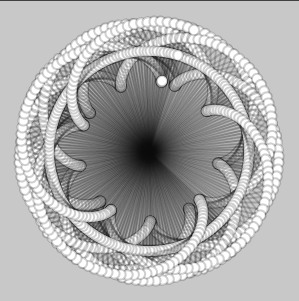
			<content:encoded><![CDATA[<p><a href="http://robertcarlsen.net/blog/wp-content/uploads/2009/01/skipdraw_comp.jpg" rel="lightbox[308]"><img class="alignright size-full wp-image-310" style="border: 1px solid black; margin-left: 3px; margin-right: 3px;" title="skipdraw_comp" src="http://robertcarlsen.net/blog/wp-content/uploads/2009/01/skipdraw_comp.jpg" alt="skipdraw_comp" width="220" height="221" /></a>Some research for our first assignment in Toy Design. Paul had an idea for a drawing toy that that would rotate, with extensions at the end of a string or rope also rotating and actually making the marks.</p>
<p>Here&#8217;s a quick sketch of the possible output. There is also an <a href="http://robertcarlsen.net/experiments/skipDraw/">animated version</a> with speed controls.</p>
<p>This is all very rough, but I wanted to mock something up before investing too much work into prototyping it.</p>
]]></content:encoded>
			<wfw:commentRss>http://robertcarlsen.net/2009/01/23/toy-design-assignment-1-research-308/feed</wfw:commentRss>
		<slash:comments>1</slash:comments>
		</item>
		<item>
		<title>(Signal to) Noise meter, ITP 4in4, day 4</title>
		<link>http://robertcarlsen.net/2009/01/15/signal-to-noise-meter-itp-4in4-day-4-296</link>
		<comments>http://robertcarlsen.net/2009/01/15/signal-to-noise-meter-itp-4in4-day-4-296#comments</comments>
		<pubDate>Thu, 15 Jan 2009 20:15:27 +0000</pubDate>
		<dc:creator>Robert</dc:creator>
				<category><![CDATA[itp]]></category>
		<category><![CDATA[make]]></category>
		<category><![CDATA[4in4]]></category>
		<category><![CDATA[analog]]></category>
		<category><![CDATA[arduino]]></category>
		<category><![CDATA[fun]]></category>
		<category><![CDATA[hacking]]></category>
		<category><![CDATA[meter]]></category>
		<category><![CDATA[processing]]></category>
		<category><![CDATA[programming]]></category>
		<category><![CDATA[visualizing]]></category>

		<guid isPermaLink="false">http://robertcarlsen.net/blog/?p=296</guid>
		<description><![CDATA[For today&#8217;s project I wanted to do something with the analog decibel meter that Tymm gave me on day one. My idea is to calculate some kind of signal to noise ratio in my email inbox and to display the value on this physical meter. Since I already get a lot of noise in there, [...]]]></description>
			<content:encoded><![CDATA[<p>For today&#8217;s project I wanted to do something with the analog decibel meter that Tymm gave me on day one. My idea is to calculate some kind of signal to noise ratio in my email inbox and to display the value on this physical meter. Since I already get a lot of noise in there, maybe the value won&#8217;t change very dynamically, but be a steady din. Perhaps I could tie into the junk mail filter to show just how much work it&#8217;s doing, like a tachometer. Who am I kidding, really, I&#8217;m likely going to jump into what all the cool kids are doing and just come up with some type of Twitter visualization&#8230;  <span id="more-296"></span></p>
<p>Regardless of the data source, for the output side I&#8217;m driving the analog decibel meter with an Arduino using pulse width modulation (PWM). Inside it seems to be a small electromagnet whose field moves the needle to the right. The movement is counteracted by several springs which keep the needle trying to pull back to the left.</p>
<p>It seems to take minimal current &lt; 1mA at 5V to peg the needle. The face of the meter indicates &#8220;1mW 600 Ohm&#8221; which I assume means that the max input is 1mW and the resistance of the unit is 600Ohm. (Please correct me if I&#8217;m wrong). I&#8217;ve installed a 220Ohm resistor and small LED in series to provide more load to the PWM pin which allows finer steps in the meter as well as protects the Arduino from any possible reverse current as the needle&#8217;s springs pull it back past the electromagnet. I likely don&#8217;t need that, but it wouldn&#8217;t be an ITP project without an LED (it&#8217;s not blinking, though).</p>
<p>In this demo the Arduino is receiving data via a serial connection from a simple Processing sketch to control the position of the needle. In the above mentioned configuration I&#8217;m mapping the input value to a PWM output range of 0-40. Sending byte 255 will change modes in the program. The default mode is to accept ASCII values of 48-52 (that&#8217;s 0-9) so I can test in a terminal. The second mode will accept all bytes bytes of 0-254, and the third mode simply reports back the received values.</p>
<p>Next step is to figure out exactly what to do with the meter; since it accepts serial data it is pretty modular.</p>
<p><object width="425" height="344"><param name="movie" value="http://www.youtube.com/v/T_784yakuvc&#038;fs=1" /><param name="allowFullScreen" value="true" /><param name="allowscriptaccess" value="always" /><embed src="http://www.youtube.com/v/T_784yakuvc&#038;fs=1" type="application/x-shockwave-flash" allowscriptaccess="always" allowfullscreen="true" width="425" height="344"></embed></object></p>
]]></content:encoded>
			<wfw:commentRss>http://robertcarlsen.net/2009/01/15/signal-to-noise-meter-itp-4in4-day-4-296/feed</wfw:commentRss>
		<slash:comments>0</slash:comments>
		</item>
		<item>
		<title>Meggy pixel video display. 4-in-4, day one.</title>
		<link>http://robertcarlsen.net/2009/01/13/meggy-pixel-video-display-4-in-4-day-one-280</link>
		<comments>http://robertcarlsen.net/2009/01/13/meggy-pixel-video-display-4-in-4-day-one-280#comments</comments>
		<pubDate>Tue, 13 Jan 2009 09:40:58 +0000</pubDate>
		<dc:creator>Robert</dc:creator>
				<category><![CDATA[itp]]></category>
		<category><![CDATA[make]]></category>
		<category><![CDATA[4in4]]></category>
		<category><![CDATA[arduino]]></category>
		<category><![CDATA[hacking]]></category>
		<category><![CDATA[meggy]]></category>
		<category><![CDATA[processing]]></category>
		<category><![CDATA[programming]]></category>
		<category><![CDATA[video]]></category>

		<guid isPermaLink="false">http://robertcarlsen.net/blog/?p=280</guid>
		<description><![CDATA[Spent most of the day at Tymm&#8217;s house, pretending to participate in 4-in-4, but mostly drinking coffee and watching videos. I did eventually get around to tinkering with my new Meggy Jr RGB from Evil Mad Scientist Laboratories. The Meggy is a pixel game platform built around a vivid 8&#215;8 LED matrix running an Arduino [...]]]></description>
			<content:encoded><![CDATA[<p>Spent most of the day at Tymm&#8217;s house, pretending to participate in <a href="http://itp.nyu.edu/ITPedia/4in4" onclick="pageTracker._trackPageview('/outgoing/itp.nyu.edu/ITPedia/4in4?referer=');">4-in-4</a>, but mostly drinking coffee and watching videos. I did eventually get around to tinkering with my new Meggy Jr RGB from <a href="http://www.evilmadscientist.com/" onclick="pageTracker._trackPageview('/outgoing/www.evilmadscientist.com/?referer=');">Evil Mad Scientist Laboratories</a>. The Meggy is a pixel game platform built around a vivid 8&#215;8 LED matrix running an Arduino compatible ATMega168. EMSL has also released a simple to use library for managing the display, buttons and speaker. It&#8217;s really a great kit.</p>
<p>I decided to ignore all the nice easy stuff <span id="more-280"></span>and get right to speaking to the Meggy&#8217;s frame buffer, a 192 byte long array containing the values for each RGB pixel. I wrote up a Processing sketch on a MacBook Pro to capture a video image, scale it to 8&#215;8, format the image in a Meggy framebuffer style array and send the whole thing via serial. The most challenging part was figuring out the framebuffer format, which although documented by EMSL was difficult for me to work out initially.</p>
<p>Also, the colors are not correct on the first try, and the RGB elements respond with different brightnesses than each other. The source code from the Meggy library provided some insight on suitable adjustment levels, which the Processing script is doing before sending along the pixel values. Fun times&#8230;enjoy the video (may help to squint at the pixels)! Code below the video.</p>
<p><object width="425" height="344"><param name="movie" value="http://www.youtube.com/v/y2YkYOLgppY&#038;fs=1" /><param name="allowFullScreen" value="true" /><param name="allowscriptaccess" value="always" /><embed src="http://www.youtube.com/v/y2YkYOLgppY&#038;fs=1" type="application/x-shockwave-flash" allowscriptaccess="always" allowfullscreen="true" width="425" height="344"></embed></object></p>
<h3>Arduino code:</h3>
<pre class="brush: cpp;">
/*
  MeggyJr_VideoDisplay
 2009 Robert Carlsen // robertcarlsen.net

 Accepts serial data of a video stream from a desktop counterpart
 Expects a header byte of 128, then 192 bytes of pixel data (&lt;= 127)
*/

#include &lt;MeggyJr.h&gt;
MeggyJr Meg;

// stores how many bytes have been received for the current frame:
byte index = 0;

void setup()
{
  Meg = MeggyJr();    // Required.
  Serial.begin(57600);
}  

void loop()
{
  // check if data has been sent from the computer:
  if (Serial.available()) {
    // read in the current byte:
    byte val = Serial.read();

    // look for the header:
    if(val == 128){
      // the header byte was found, the beginning of a new frame in next:
      index = 0;
      return;
    }

    // write the current info directly to the MeggyFrame buffer
    // this may cause tearing or other artifacts...please clean up if you like <img src='http://robertcarlsen.net/blog/wp-includes/images/smilies/icon_smile.gif' alt=':)' class='wp-smiley' />
    // the frame data has been packed in the expected order by the sender program
    // also, only the low four bits are used for pixel color. &quot;&amp; 0x0F&quot;  masks them.
    // i'm thinking of packing other data, such as vertical blanking
    // pixel index or &quot;timecode&quot; in the high bits.
    Meg.MeggyFrame[index] = val &amp; 0x0F;
    index++;
  }

  // don't really need a delay here
  // delay(7);
}
</pre>
<h3>Processing sketch:</h3>
<pre class="brush: java;">
/*
  MeggyVideoSend
  2009 Robert Carlsen // robertcarlsen.net

  Captures the video camera image, downsamples it to 8x8
  and packs the pixel data in a format compatible with the Meggy Jr RGB.
  Finally, send the pixel data to the Meggy

  Requires the complementary MeggyJr_Video firmware loaded on the Meggy
*/

import processing.video.*;
import processing.serial.*;

Serial myPort;  // Create object from Serial class
Capture myCapture; // set up a video capture object

// the LEDs respond with varied brightness.
// this adjustment will color correct them.
// feel free to experiment.
float[] adj = {0.6,1.0,0.5}; // red,green,blue

void setup() {
  size(300,300);

  // open a serial port to the Meggy. you may need to change the 0. check the list in the console.
  String portName = Serial.list()[0];
  myPort = new Serial(this, portName, 57600);

  // start a video capture:
  myCapture = new Capture(this, 8, 8, 30);

  // if you have trouble with the above, uncomment the below and replace &quot;Camera Name&quot; with the appropriate device.
  // println(Capture.list());
  // myCapture = new Capture(this, width, height, &quot;Camera Name&quot;, 30);
}

void draw() {
  // create an array for the pixel data:
  // one header byte and 192 bytes for pixels (64 pixels * 3 bytes / pixel)
  byte[] c = new byte[193];

  // read the pixels from the video capture:
  myCapture.loadPixels();

  // header byte:
  c[0] = (byte)128;

  // loop through all the pixels in the video image
  // adjust the colors and pack the bytes in the correct order:
  for(int i = 0; i &lt; 64; i++){
    // adjust colors:
    // for an explanation of what's going on, look up &quot;bit shifting&quot; on the Processing site.
    int r = (int)(adj[0]*((myCapture.pixels[i]&gt;&gt;16) &amp; 0xFF));
    int g = (int)(adj[1]*((myCapture.pixels[i]&gt;&gt;8) &amp; 0xFF));
    int b = (int)(adj[2]*((myCapture.pixels[i]) &amp; 0xFF));

    // the Meggy expects 0-15 values only.
    // right shift &quot;&gt;&gt;4&quot; essentially divides our 8-bit values in Processing (0-255) by 16 giving a range of 0-15.
    // the Meggy packs the pixels into a long array, similar to the pixels in Processing.
    // however, each pixel is stored in 3 separate bytes rather than one big integer.
    // the (messy) conversion is below. we're also adding 1 to the index to account for the header byte.
    c[24*(i/8)+i%8+17] = (byte)(r&gt;&gt;4); // r: index + 16
    c[24*(i/8)+i%8+9] = (byte)(g&gt;&gt;4); // g: index + 8
    c[24*(i/8)+i%8+1] = (byte)(b&gt;&gt;4);  // b: index
  }

  // send the whole frame data out via serial:
  myPort.write(c);

  // draw the current frame to the computer screen for preview:
  image(myCapture,0,0,width,height);
}

// read in a new frame of video if available:
void captureEvent(Capture myCapture) {
  myCapture.read();
}
</pre>
]]></content:encoded>
			<wfw:commentRss>http://robertcarlsen.net/2009/01/13/meggy-pixel-video-display-4-in-4-day-one-280/feed</wfw:commentRss>
		<slash:comments>0</slash:comments>
		</item>
		<item>
		<title>Touch Fingerprint</title>
		<link>http://robertcarlsen.net/2008/12/17/touch-fingerprint-253</link>
		<comments>http://robertcarlsen.net/2008/12/17/touch-fingerprint-253#comments</comments>
		<pubDate>Thu, 18 Dec 2008 04:57:33 +0000</pubDate>
		<dc:creator>Robert Carlsen</dc:creator>
				<category><![CDATA[Uncategorized]]></category>
		<category><![CDATA[Visualizing the Five Senses]]></category>
		<category><![CDATA[itp]]></category>
		<category><![CDATA[eyes]]></category>
		<category><![CDATA[processing]]></category>
		<category><![CDATA[visualizing]]></category>

		<guid isPermaLink="false">http://robertcarlsen.net/blog/?p=253</guid>
		<description><![CDATA[An in-class exercise in trying to convey the sense of touch on-screen. Given a matrix of white points on a black field, we had to rework the project with our own &#8220;fingerprint&#8221; in about 30 minutes.
Applet and code

]]></description>
			<content:encoded><![CDATA[<p>An in-class exercise in trying to convey the sense of touch on-screen. Given a matrix of white points on a black field, we had to rework the project with our own &#8220;fingerprint&#8221; in about 30 minutes.<span id="more-253"></span></p>
<p><a href="http://www.robertcarlsen.net/media/itp/vis5/touchFingerprint/" onclick="pageTracker._trackPageview('/outgoing/www.robertcarlsen.net/media/itp/vis5/touchFingerprint/?referer=');">Applet and code</a></p>
<p><a href="http://robertcarlsen.net/blog/wp-content/uploads/2008/12/eyes-touch.jpg" rel="lightbox[253]"><img class="alignnone size-medium wp-image-254" title="eyes-touch" src="http://robertcarlsen.net/blog/wp-content/uploads/2008/12/eyes-touch-300x214.jpg" alt="" width="383" height="273" /></a></p>
]]></content:encoded>
			<wfw:commentRss>http://robertcarlsen.net/2008/12/17/touch-fingerprint-253/feed</wfw:commentRss>
		<slash:comments>0</slash:comments>
		</item>
		<item>
		<title>Visualizing (proxemic) space</title>
		<link>http://robertcarlsen.net/2008/12/17/visualizing-proxemic-space-248</link>
		<comments>http://robertcarlsen.net/2008/12/17/visualizing-proxemic-space-248#comments</comments>
		<pubDate>Thu, 18 Dec 2008 04:27:20 +0000</pubDate>
		<dc:creator>Robert Carlsen</dc:creator>
				<category><![CDATA[Uncategorized]]></category>
		<category><![CDATA[Visualizing the Five Senses]]></category>
		<category><![CDATA[itp]]></category>
		<category><![CDATA[cycling]]></category>
		<category><![CDATA[nyc]]></category>
		<category><![CDATA[processing]]></category>
		<category><![CDATA[proxemics]]></category>
		<category><![CDATA[visualization]]></category>
		<category><![CDATA[visualizing]]></category>

		<guid isPermaLink="false">http://robertcarlsen.net/blog/?p=248</guid>
		<description><![CDATA[In conducting research for the CycleSense bicycle traffic proximity system I gathered data about the amount of space behind a bicycle rider traveling through typical New York City traffic at various times and locations. The initial visualization of this data was to graph the distances over time to look for specific events that the system [...]]]></description>
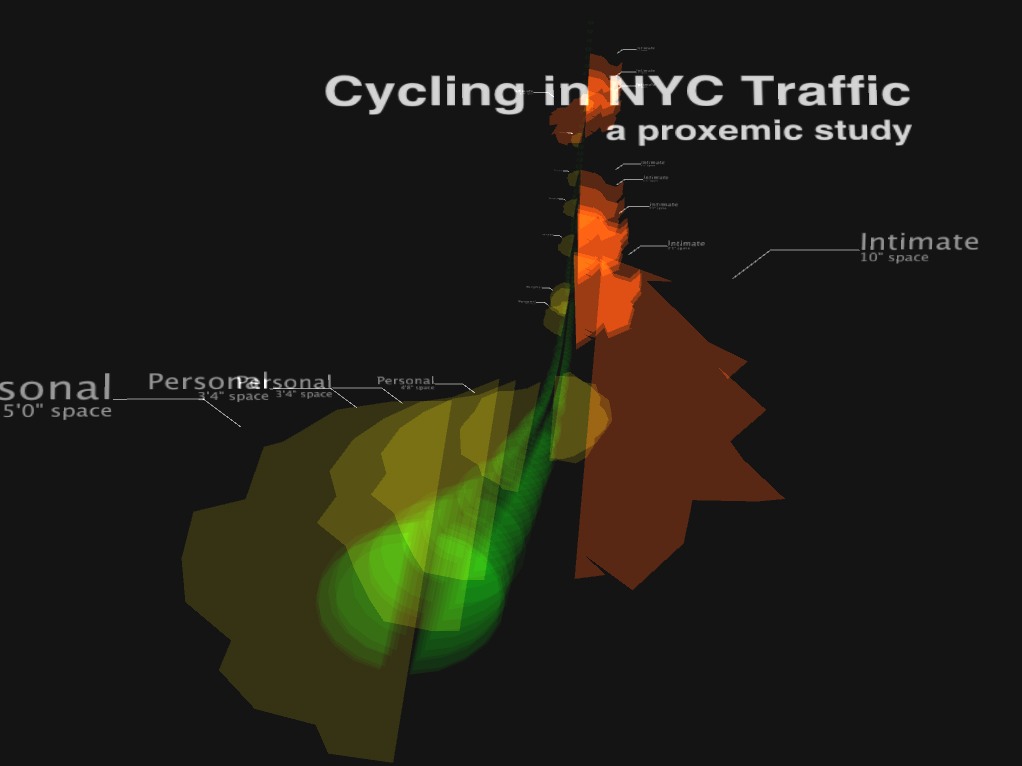
			<content:encoded><![CDATA[<p>In conducting research for the CycleSense bicycle traffic proximity system I gathered data about the amount of space behind a bicycle rider traveling through typical New York City traffic at various times and locations. The initial visualization of this data was to graph the distances over time to look for specific events that the system would need to detect in order to be useful. I cross-referenced the space data with video taken on the same rides</p>
<p><a href="http://robertcarlsen.net/blog/wp-content/uploads/2008/12/cycling-proxemic1.jpg" rel="lightbox[248]"><img class="alignnone size-medium wp-image-250" title="cycling-01" src="http://robertcarlsen.net/blog/wp-content/uploads/2008/12/cycling-proxemic1.jpg" alt="" width="442" height="329" /></a></p>
<p><span id="more-248"></span></p>
<p>While the <a href="http://robertcarlsen.net/blog/?p=232">graphing application</a> was certainly useful in tuning the system, it was confusing for viewers to understand. I don&#8217;t really view this as a fault of the design since it was intended to fulfill a specific need in developing the project. However, I really would like to convey the moments of traffic&#8217;s encroachment into a cyclist&#8217;s personal space.</p>
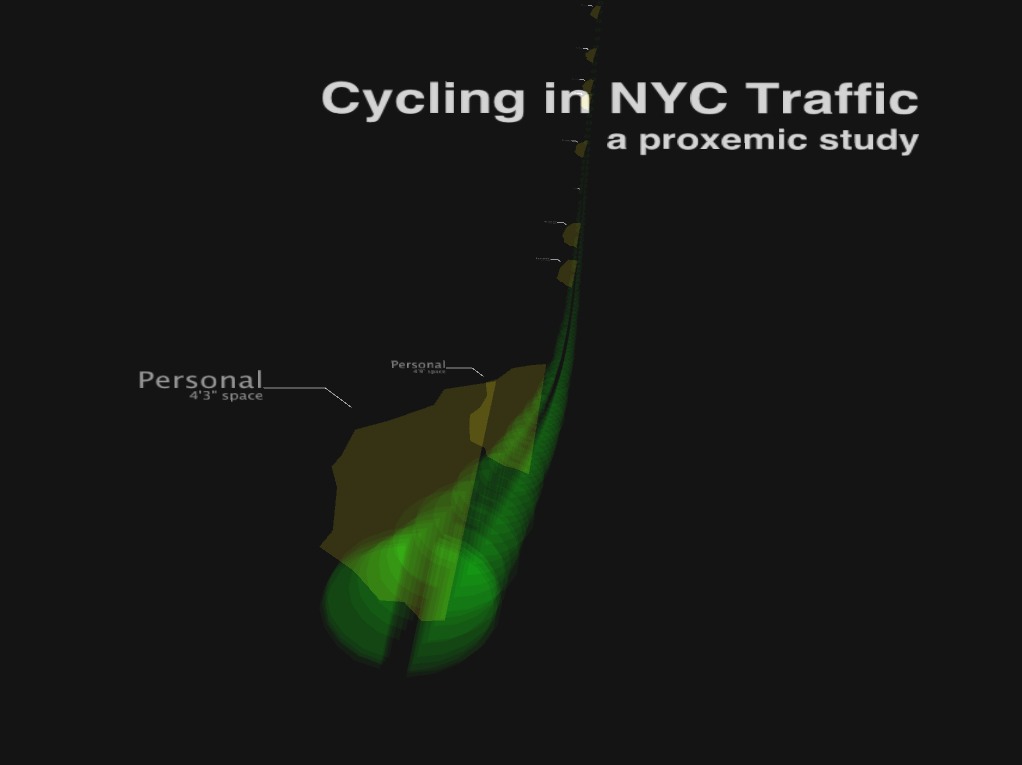
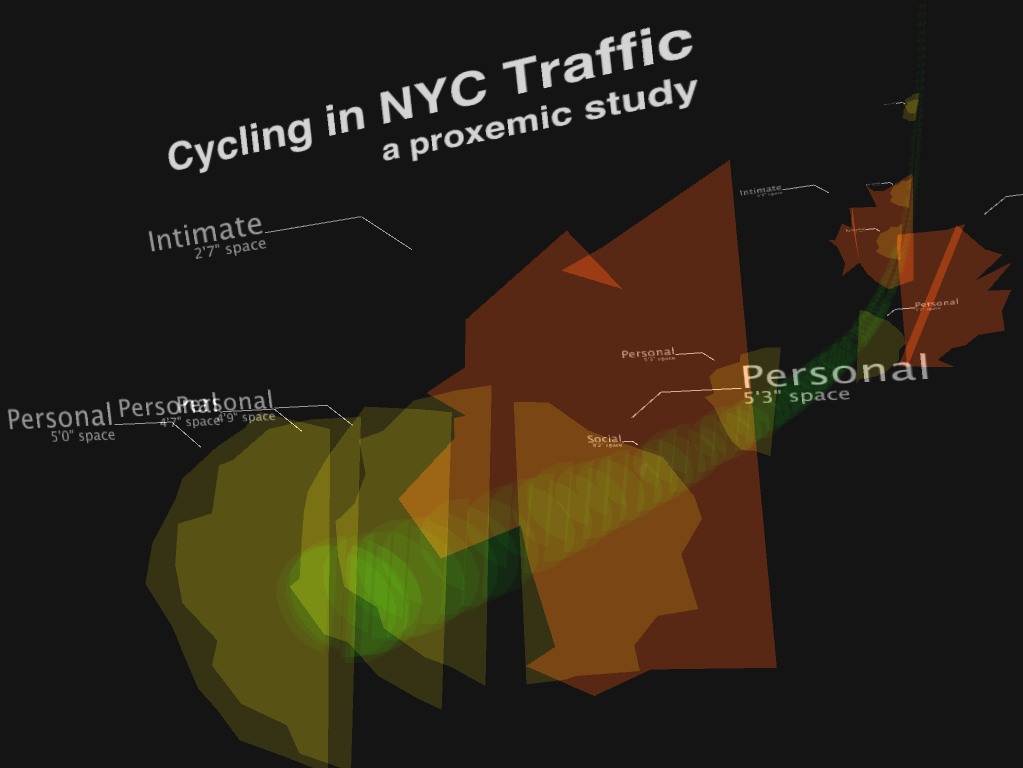
<p>I was directed to look into the field of proxemics and the work of Edward Hall by our &#8220;Visualizing the Five Senses&#8221; professor, Jane Nisselson (<a href="http://www.vbnyc.com/" onclick="pageTracker._trackPageview('/outgoing/www.vbnyc.com/?referer=');">Virtual Beauty</a>). What interested me most was the depiction of personal space into four categories: Intimate, Personal, Social and Public. Although this work primarily seems to deal with intrapersonal relationships I wondered if the categories could be used to express the space around a cyclist&#8230;specifically to communicate the space to non-cyclists.</p>
<p>Here are several images of the resulting visualization. The project is animated &#8211; I&#8217;ll an example of the movement online in the next few days, with the source code.</p>
<p><a href="http://robertcarlsen.net/blog/wp-content/uploads/2008/12/cycling-proxemic2.jpg" rel="lightbox[248]"><img class="alignnone size-medium wp-image-249" title="cycling-02" src="http://robertcarlsen.net/blog/wp-content/uploads/2008/12/cycling-proxemic2.jpg" alt="" width="450" height="336" /></a></p>
<p><a href="http://robertcarlsen.net/blog/wp-content/uploads/2008/12/cycling-proxemic3.jpg" rel="lightbox[248]"><img class="alignnone size-medium wp-image-252" title="cycling-03" src="http://robertcarlsen.net/blog/wp-content/uploads/2008/12/cycling-proxemic3.jpg" alt="" width="449" height="336" /></a></p>
]]></content:encoded>
			<wfw:commentRss>http://robertcarlsen.net/2008/12/17/visualizing-proxemic-space-248/feed</wfw:commentRss>
		<slash:comments>0</slash:comments>
		</item>
	</channel>
</rss>